
StudioPlus Payments
The easier way to take payments is here.

StudioPlus Payments is our new payment option in Stratus, powered by Stripe. We believe it can lower processing costs for many studios while adding features you’ve been asking for: modern card readers, payment links, Apple Pay and Google Pay, Buy Now, Pay Later, ACH, surcharging, and tips.
No one is required to switch. Your current payment integration isn’t going anywhere, and StudioPlus Payments is simply another option. The one exception is the new Stratus Online Booking Portal, which can only accept payments through StudioPlus Payments.
All the ways to get paid with StudioPlus Payments
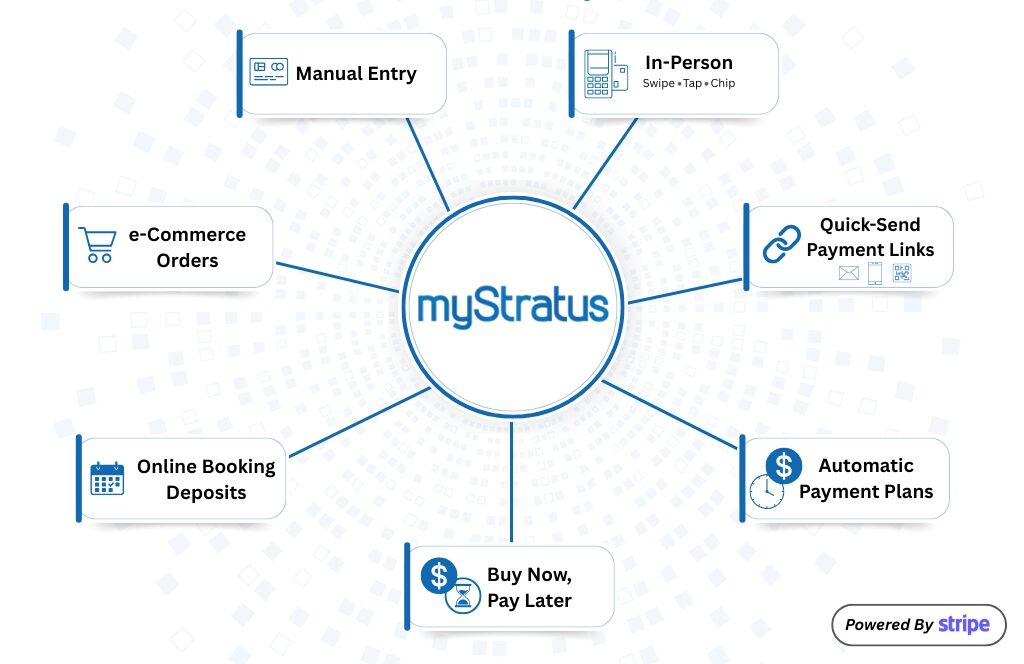
In-Person Payments
Accept payments with compatible Stripe readers, including swipe, chip, tap, and mobile wallets like Apple Pay and Google Pay. With Tap to Pay, you can also accept contactless payments on a supported device without a separate card reader. Manual card entry is also available in Stratus when needed.
Online Payments
Send secure payment links by email, SMS, or QR code, and accept payments and deposits through InspiredByYou and your Online Booking Portal. Clients can also pay by ACH bank transfer from a U.S. bank account.
Flexible Billing
Offer payment plans, keep cards on file, and manage repeat or scheduled payments inside Stratus. Make paying feel faster and easier.
Checkout Options
Enable optional tipping, buy now, pay later options such as Affirm, Klarna, and Afterpay, and credit card surcharging based on what works for your business. There are now so many ways to get paid.
Payout Reconciliation
Use an automated reconciliation tool to help ensure your transactions and payouts are accurately recorded in Stratus and your accounting software, including QuickBooks Online.
Built To Grow
A modern payment platform that will keep growing and become more tightly integrated with everything we're building in Stratus.
Pricing
Accept payments with simple, transparent pricing. You only pay per successful card transaction.
Each rate combines Stripe’s processing fee (2.9% + 30¢ online, 2.7% + 5¢ in person) with the 1.5% StudioPlus application fee. Stripe’s standard U.S. rates as of September 2026; rates can vary by country, payment method, and card type. See Stripe’s pricing page.
FAQs
For most successful card transactions processed through StudioPlus Payments, the fee is 4.4% + 30¢ for online payments, or 4.2% + 5¢ for in-person payments with a compatible Stripe card reader.
This total includes:
- Stripe processing fee: 2.9% + 30¢ online, or 2.7% + 5¢ in person
- StudioPlus application fee: 1.5%
These are Stripe’s standard U.S. rates as of September 2026, and they can vary by country, payment method, and card type. For current Stripe pricing in your country, see Stripe’s pricing page.
Stripe calculates the total fee for each transaction, including both the Stripe processing fee and the StudioPlus application fee, and automatically deducts it from your daily payout.
There are two main ways to reduce the net impact of card processing fee:
1. Use a compatible Stripe Reader for in-person payments
StudioPlus supports the Stripe Reader S700 and Stripe Reader S710. In-person card-present transactions have a lower Stripe processing rate: 2.7% + 5¢ instead of 2.9% + 30¢, for a total of 4.2% + 5¢ including the StudioPlus application fee. Reader hardware is purchased separately. See Stripe Terminal Device Options for details.
2. Enable Credit Card Surcharge
StudioPlus Payments includes an optional Credit Card Surcharge feature. When enabled, you can add a surcharge for customers who choose to pay by credit card, which can reduce or offset the net cost of card processing to your business. This is a common standard practice across many industries.
This feature is optional and configurable, so you can decide what fits your pricing strategy and customer experience.
Start with your real numbers, not an advertised rate. Processors structure and report fees very differently, with transaction fees, interchange costs, different rates for different cards, and monthly, PCI, or statement fees, so advertised rates are hard to compare.
For an apples-to-apples comparison, take the total processing fees you actually paid over a month, quarter, or year, and divide that by your total credit card volume for the same period. That gives you your effective processing rate. Compare that number with the StudioPlus Payments rates above.
If your current processor still comes out ahead for your business, you’re welcome to stay with it. StudioPlus Payments is another option, not a requirement.
StudioPlus Payments is officially live in the 2026 version of Stratus! You can sign up directly through the Desktop app or through Stratus Online.
Yes! Spectra functionality will be announced at a later date. However, because of the nature of a local solution vs cloud-based solution, Spectra will not be able to have the same features as the Stratus integration.
Yes, if you sign up with the same email address you use for your existing Stripe account, Stripe will prompt you if you’d like to share your “Legal Entity” (essentially your ownership) with this new account.
The new account will remain separate from your existing one, but your ownership and overall onboarding will be much smoother!
StudioPlus Payments is a new payment solution in Stratus. If you use our legacy integration with Global Payments (TSYS) or one of our other legacy integrations, it will continue to work as it does today. Payments through the new Stratus Online Booking Portal are available with StudioPlus Payments only.
Ready to get started?
We already have a number of studios using StudioPlus Payments, and the response has been excellent. Set up StudioPlus Payments in Stratus with our step-by-step getting started checklist.