
 Q: Can I keep track of Groupon promotions with Stratus? #
A: There are several third-party coupon sellers that are popular with photographers, such as Groupon and Living Social. If you’ve used these services, you realize that it’s important to:
- Record and collect sales tax when a coupon is redeemed.
- Report redeemed coupons to the seller so you can get paid.
Instructions #
Step 1 – Create Discounted Item in your Price List #
-
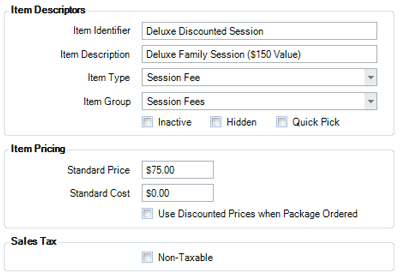
Create a new item in your price list that represents what the client is getting for their purchased Groupon. For example, create an item called “Deluxe Family Session ($150 value)” and choose “Session Fee” as the Item Type.
-
Set the price of this item equal to be the actual amount of the Groupon, like $75.
-
Make sure the Non-Taxable box is NOT checked if this item is taxable in your area.
-
Save and close the item when finished.
Step 2 – Create Coupon in your Price List #
-
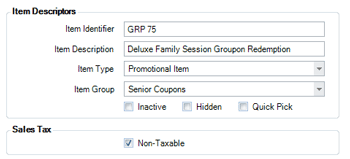
Create a new item in your price list and choose “Promotional Item” as the Item Type. Call it something like “Deluxe Family Groupon Redemption.”
-
Set the item as Non-Taxable.
-
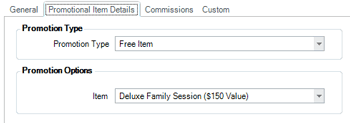
On the Promotional Item Details tab, choose “Free Item” as the Promotion Type.
-
In the Promotion Options section, choose the item you created in step 1 (the discounted session) as the free item.
-
Check both the Prompt for Coupon Number and Require Unique Coupon Number options. Note: This is important for your redemption reports.

-
Save and close the item when finished.
Step 3 – Apply Coupon to an Invoice #
-
Create or open an invoice.
-
Add the Groupon to the invoice (i.e., “Deluxe Family Groupon Redemption”).
-
The software will prompt you to enter the Groupon number and will verify the Groupon has not already been used.
-
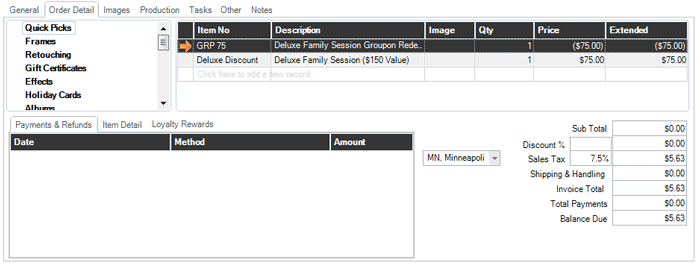
The Groupon AND the free product will both be added to the invoice.
-
The dollar amounts offset each other, leaving just the sales tax for you to collect from the client.
Step 4 – Export Redemption Reports #
-
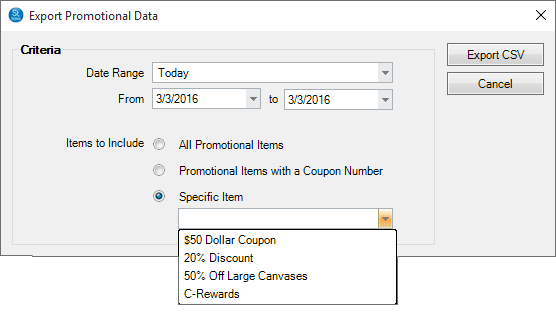
Go to Utilities > Export Promotional Data to export your redeemed Groupon codes to a CSV file.
-
Submit this file to Groupon for payment.
See also:
Creating a Coupon or Promotion
Using Coupons