
You can copy an existing invoice, linking it to the same session or to a different session/client. This will copy all the order information. Here’s how:
-
Open the invoice you want to copy.
-
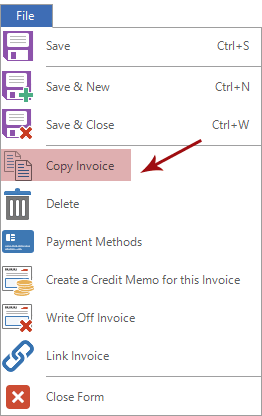
Go to File menu and click Copy Invoice.
-
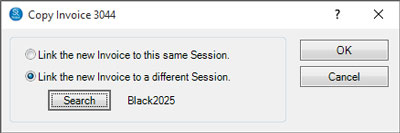
Choose whether the new invoice should be linked to the same session or a to different session/client. To link the invoice to a different session, you’ll need to search to find the right client and then choose the appropriate session. The session number will be then be displayed next to the Search button.
-
Click OK to create the new invoice.
-
Both the old and new invoice records will be open for additional modifications. Note: Depending on the client you selected, the invoice records may look identical (except for the invoice number)! You’ll see “New Invoice” at the top of the new invoice record.
-
Save and close both invoices when finished.