
#
The Invoices hubdisplays invoice records. The records displayed can be sorted by any of the fields shown. Just click the column heading and the records will sort by that column. Click again and the records are sorted in reverse order. See Customizing the Hubs for more information on how to change the look of the Invoices hub.
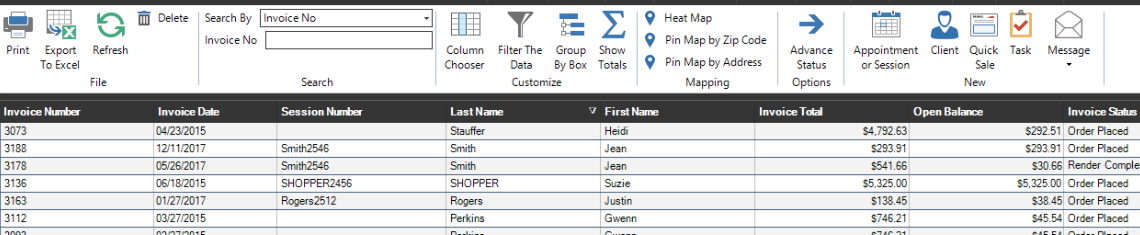
You may also select which invoices are displayed, or search for an invoice using the Search box in the upper right corner. Click the down arrow next to the search window box and drag down to the type of criteria you want to use to display or search. Then, type the specific criteria in the search box and press Enter, or select the criteria from the drop-down menu and press Enter.
Double-click a record to open that Invoice. See also: Invoice How To’s
Invoice Hub Ribbon #
| Icon | Name | Description |

|
Print all invoices showing on the hub. | |
 |
Export to Excel | Export the currently displayed invoices to an Excel file. |

|
Refresh | Refresh the grid to reflect any database changes that may have occurred. |
 |
Delete |
Delete the selected record. This will delete any associated records PERMANENTLY. Note: You can’t delete an Invoice with Payments or Production Orders on them. See also: Deleting an Invoice |
| Search |
Search by Invoice No, Web Order No, Bill-To Name, Invoice Date, Invoice Due Date, Session Date, Invoice Status, Invoice Type or Filter.
|
|
| Customize | Use these options to group, sort, and filter the list. See also: Customizing the Hubs | |
| Mapping | Sort your clients by Heat Mat, Zip Code, or Address. See also: Stratus Maps | |
 |
Advance Status | Update the status of one or more tasks. Note: Task statuses may vary by task type, so tasks must be of the same type in order to update them together. |
 |
Appointment or Session | Launch the Scheduling Wizard to create a new appointment or session. See also: Scheduling Wizard |
 |
Client | Create a new client. See also: Creating a Client |
 |
Quick Sale | Create a new “Quick Sale” invoice that is not related to a client. See also: Quick Sale Invoices |
 |
Task | Create a new task. |
 |
Message | Create a new email or SMS text message. |