
#
  |
NOTE: This feature is available in the Professional and Enterprise versions of Stratus Desktop. |
Product lines are used to categorize the sales figures on your sales reports and to assign commissions. Create product lines that are helpful for your company as it relates to your sales reports and commission tracking. For example, you may want to set up product lines such as: albums, frames, prints, greeting cards, gift cards, and so on. Once you’ve set them up, you can choose a product line for each item in your Stratus price list(s). See also: Price List
Setting up Product Lines #
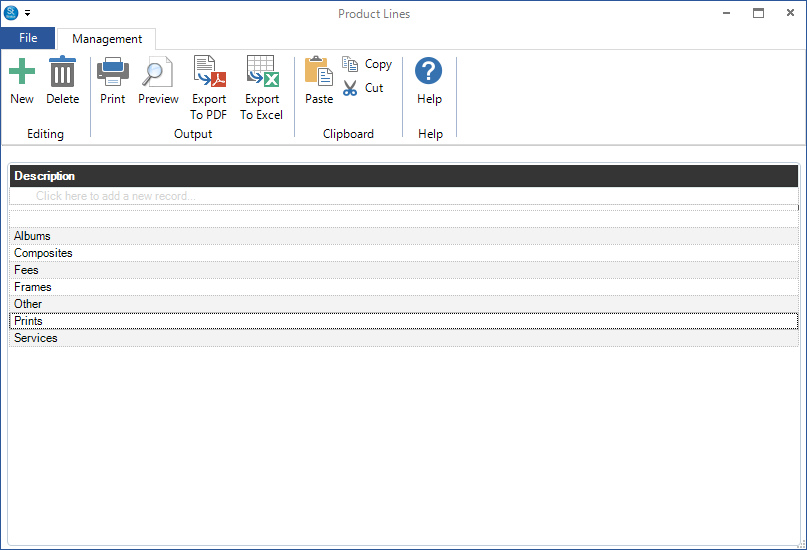
- Go to Maintenance > Price List > Product Lines.
-
Click New to create a product line or Double-Click a line to make changes to an existing one.
-
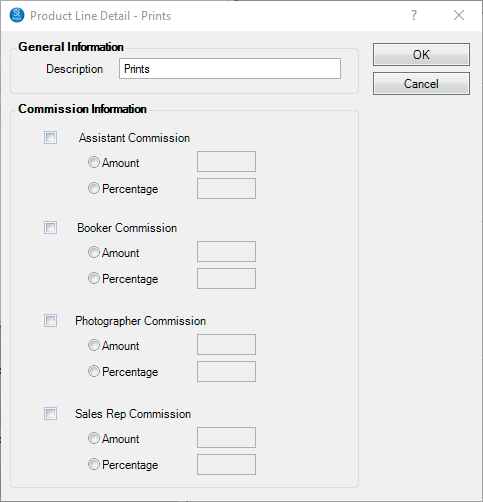
Enter the description (or name) of the product line.
-
If the product line is able to earn commission, complete the following:
-
Check the box for each employee type that can earn commissions on each product – booker, photographer, assistant, and sales rep.
-
Select either the commission Percentage or Dollar Amount and enter the amount.
-
-
Click OK to save the product line.
-
Close the window when finished.
See also: Sales Analysis Report and Employee Commissions