|
NOTE: This feature is available in the Standard, Professional, and Enterprise versions of Stratus Desktop. |
Create coupons and promotions in your price list and then apply them to your invoices during the sales process. Promotions can include:
- Dollar Off
- Percentage Off
- Free Item
- Loyalty Reward
To create these coupon items, refer to Creating a Coupon or Promotion
Applying a Coupon to an Invoice #
-
Create or open an invoice.
-
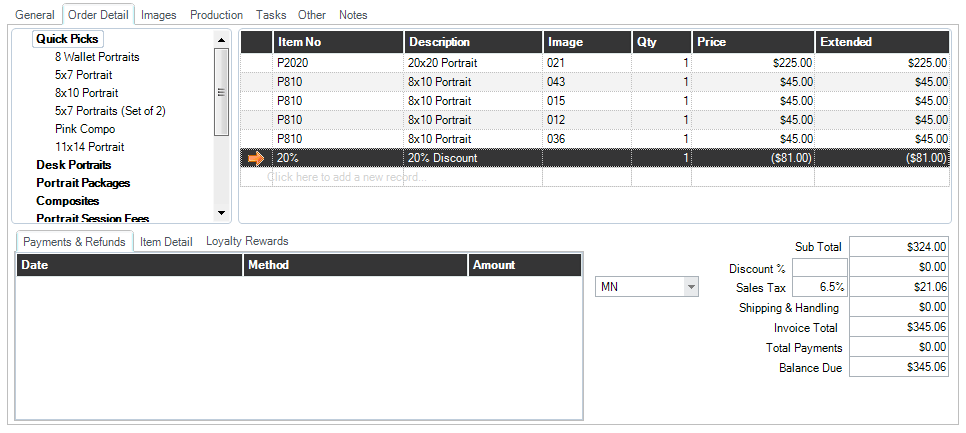
Add the coupon to the invoice by finding it in the price list (on the left) or by typing in the Item No.
-
Enter the coupon number if required.
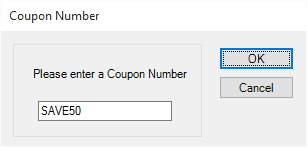
Note: The coupon number will be added to the invoice in parentheses.

-
Save the invoice.
-
Create a payment for the amount due. Note: In the case of certain “Free Item” promotions, this may only be a small sales tax amount.
-
Save and close the invoice and payment.
Coupon Redemption Reports #
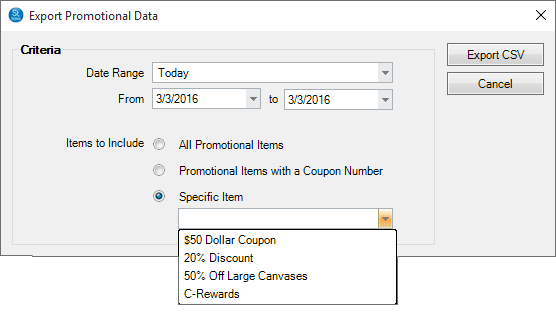
Some types of coupons are sold through a third-party, such as Groupon or Living Social. In these cases, you need to create redemption reports you can submit to the seller for payment. This is done through Utilities > Export Promotional Data.