
It can be very helpful to know when the sunrise and sunset times are when booking a session for a date in the future. The software can automatically display those times for you, based on your location! Here’s how:
-
Open the calendar.
-
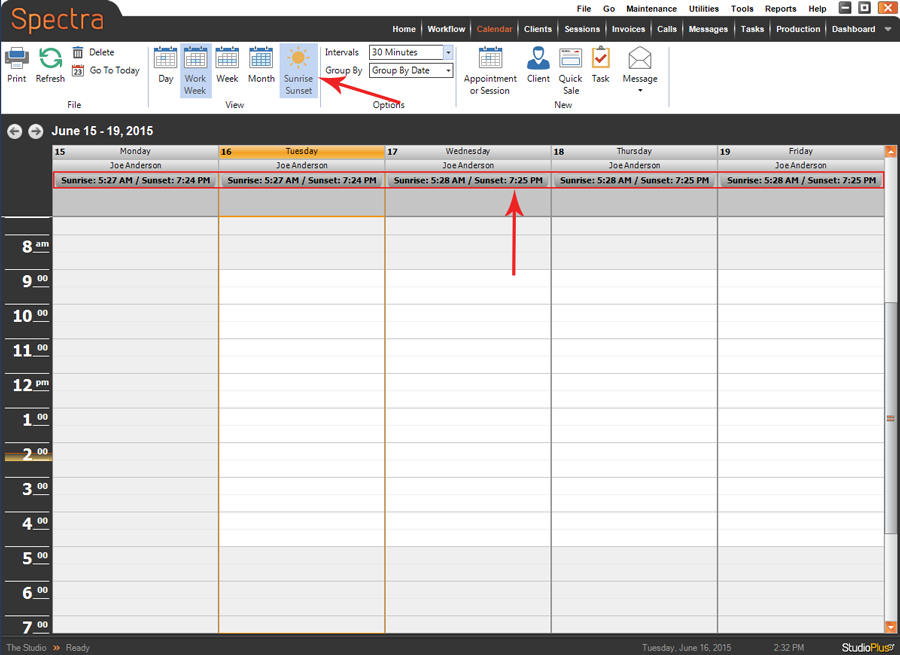
Click Sunrise Sunset on the ribbon to turn on the sunrise/sunset times for each day. Click again to turn them off.
-
When you open the calendar, sunrise/sunset times will not automatically be displayed (by default) and will need to be turned on by clicking the option on the ribbon. But, each user can change this default in their User Preferences.
-
Go to Maintenance > Preferences > User Preferences.
-
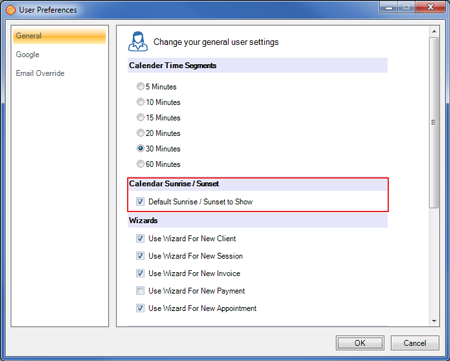
On the General tab, check Default Sunrise/Sunset to Show.
-
Click OK to save your preferences.
-
Now the sunrise/sunset times will automatically be displayed when this user is logged in. For more about User Preferences, refer to User Preferences.