
A strong referral program is key to a successful business. Stratus provide the tools you need to start tracking your own referral program. First learn how to enter referrals and then how to track them.
Entering Referrals #
Follow these steps to enter referrals:
-
Open the client that was referred.
-
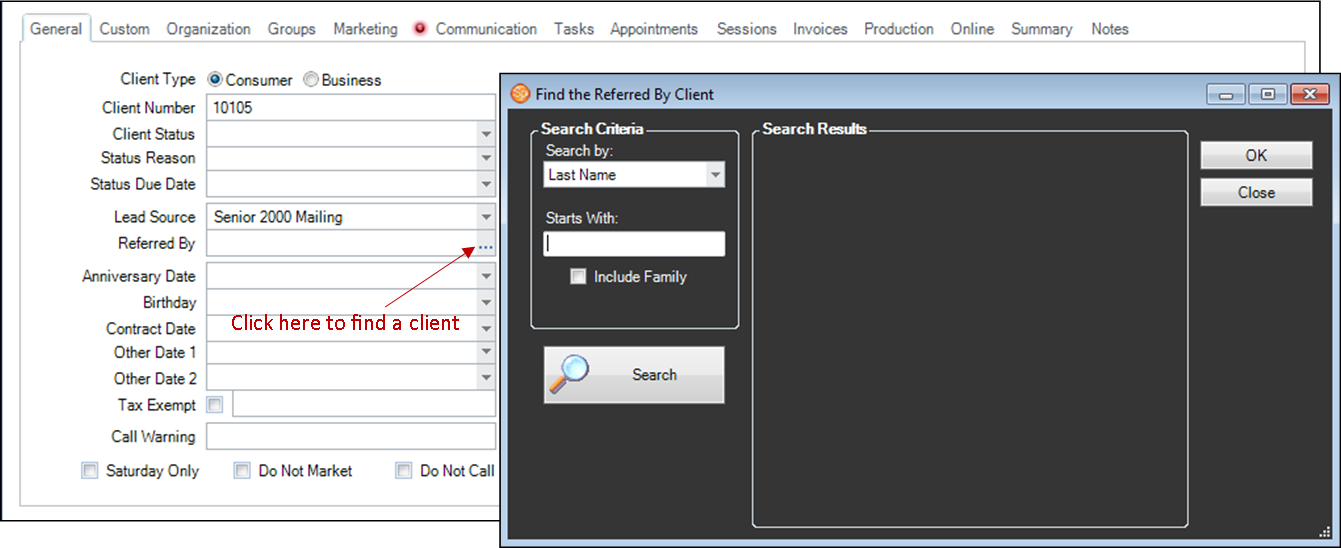
Click the browse button by the “Referred By” field on the General tab of the client record.
-
Search for the client who referred this client. Note: The client must have been entered into the software prior to the search.
-
Click OK to fill in the “Referred By” field with their name.
-
This client is now referred by a different client in your database.
Tracking Referrals #
Follow these steps to track referrals:
- Open a client that you want to check referral information for.
-
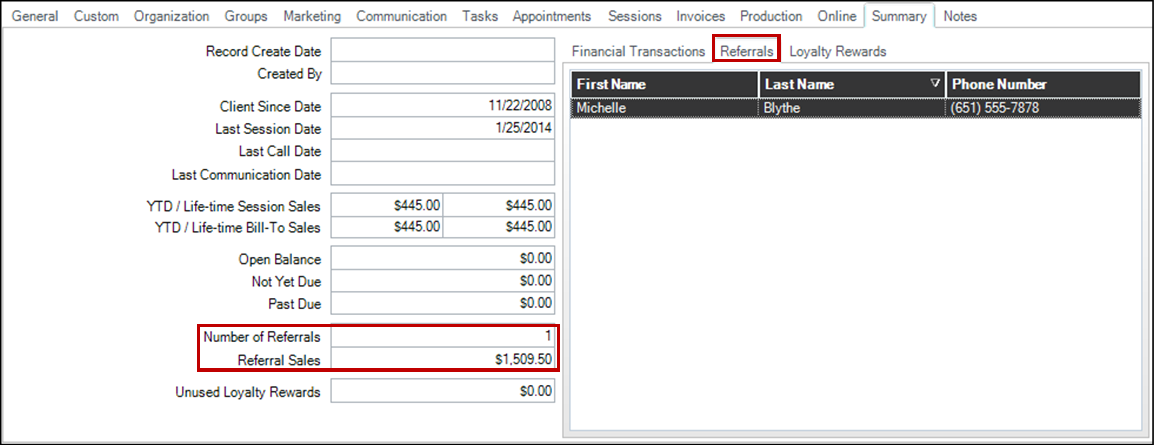
Go to the Summary tab of the client record.
-
The last two fields, “Number of Referrals” and “Referral Sales,” track your referrals.
-
Number of Referrals – The number of clients that this client has referred.
-
Referral Sales – The amount of sales that have come from all the clients that this client referred.
-
-
The Referrals tab in the window on the right will also list the names of each client that was referred by this client.