
 Q: How do I change my SendGrid password? #
A: It’s important that you DO NOT change your password through the SendGrid portal. If you do, Stratus will no longer be able to communicate with your SendGrid account. Instead, change your password in Stratus Desktop, or Stratus Web. Follow the instructions below.
Changing a SendGrid Password #
-
Log in to the appropriate software — Stratus Desktop, or Stratus Web.
-
Go to Maintenance > Preferences > Company Preferences and open the Email tab.
-
Click Change Password.
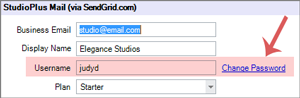
-
Enter your new password twice.
-
Click OK to save your preferences.
-
That’s it! Your password will be updated in Stratus as well as in SendGrid. You can use your new password the next time you log in to the SendGrid portal.