
   |
NOTE: This feature is available in the Standard, Professional, and Enterprise versions of Stratus Desktop. |
Render printers are part of the in-house printing workflow. You can define each printer you use for digital printing and then choose a specific printer in your render profile(s) to send jobs directly to the printer. You can also assign printers to printer “pools” that share the load of printing certain types of jobs. See also: Render Profiles and Render Printer Pools
Rendering profiles, printer pools, printers…Help! Take a look at the Printing Workflow Overview and Setting up the Printing Workflow to see how they all fit together!
Requirements #
- Each printer must have a Windows print driver.
Setting up a Printer #
-
Go to Maintenance > Digital > Render Printers.

-
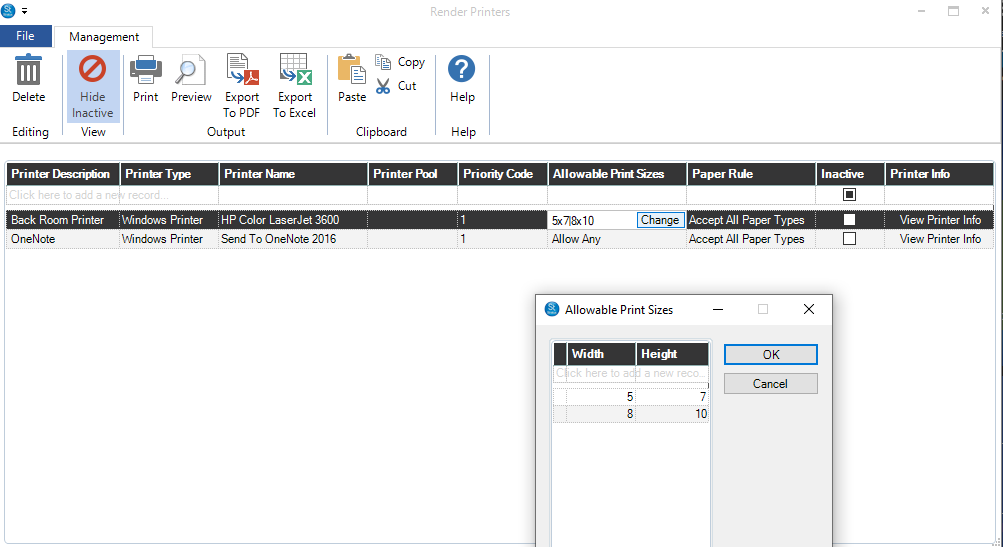
Click the first line in the grid to add a new printer.
-
Give the printer a descriptive name.
-
Link the printer to a Windows printer on your system. Open the drop-down list and choose the appropriate printer. This is required! You can only print to printers that have a Windows print driver.
-
If you’re using printer pools, choose the following: (See Render Printer Pools for more information.)
- Render Printer Pool (optional) – Assign the printer to a specific pool.
- Priority Code(optional) – Priority codes can be used when allocating jobs between printers in a printer pool.
- Next, enter Allowable Print Sizes (optional). Use this feature in cases where you need to send separate print sizes to the same printer using different printer drivers. The default setting is “Allow Any.” Click Change to open a new window where you can enter specific print sizes. Click OK when finished.
- Add additional printers as required.
- Close the window when finished.