
   |
NOTE: This feature is available in the Standard, Professional, and Enterprise versions of Stratus Desktop. |
Printer pools are an optional part of the printing workflow. They are used to group printers together to be used as a “pool” of printers. Advantages of using printer pools include:
- For Enterprise clients – It’s easier to manage print settings because printer pool settings can be established at the corporate level. Note: Individual printer settings are defined at each location.
- A render profile can be linked to a single printer pool.
Setting up a Printer Pool #
-
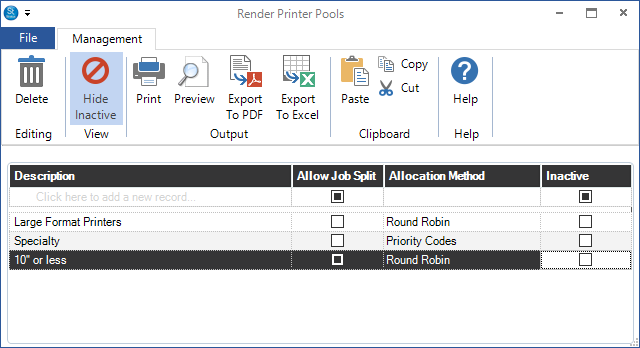
Go to Maintenance > Digital > Render Printer Pools.
-
Click the first line in the grid to add a printer pool.
-
Give the pool a descriptive name.
-
Choose the following options:
-
Job Split – Check this box to allow each print job to be split between the printers in the pool. For example, if two printers are available, a single job would be split between the two printers to speed up the printing process.
-
Allocation Method – This setting determines how jobs should be allocated between printers. Choose Round Robin to evenly distribute jobs between the printers. Choose Priority Code to always give preference to printers with a higher priority. Priority settings for each individual printer are chosen in Maintenance > Digital > Render Printers. See also: Render Printers
-
Inactive – Check this box to take a printer offline.
-
-
Repeat to create another pool.
-
Close the window when finished.