


NOTE: This feature is available in the Professional and Enterprise versions of Stratus Desktop.
-
On the session General tab, check the Use Advanced Calendar Options box in the lower-right corner.
-
A new Calendar tab will appear.
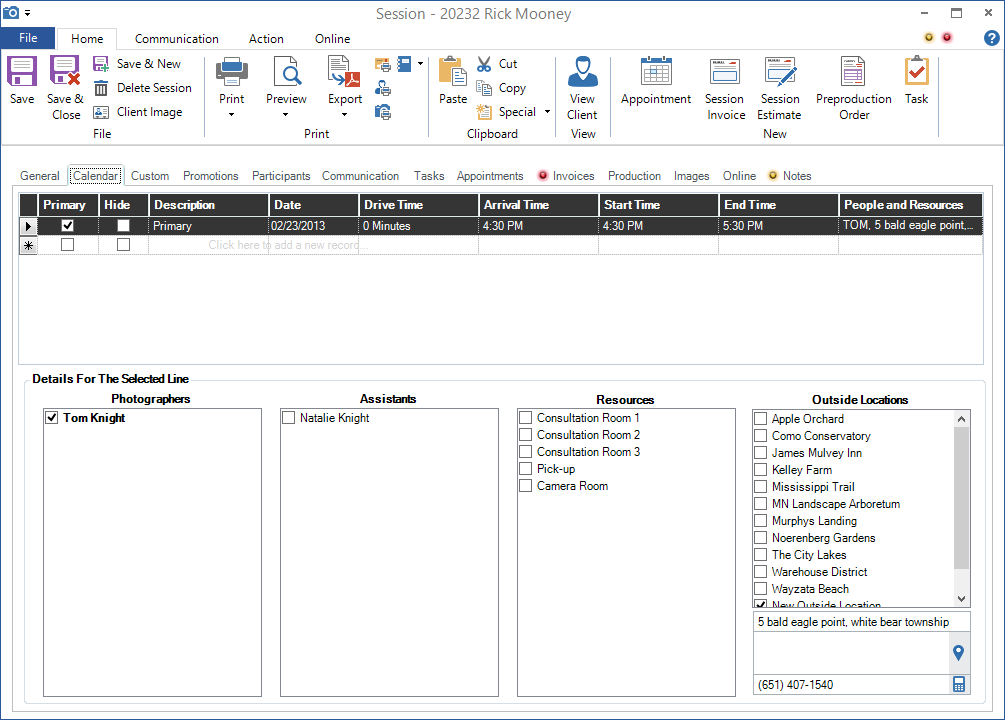
Session – Calendar Tab (Advanced Scheduling)
-
The Calendar tab will list the primary event. This primary record is used to determine the primary date/time and the primary photographer. Note: Sales from this session will be assigned to the primary photographer.
-
Click on a new line to schedule another event.
-
Choose or enter an event description and the date/time. Use the Hide checkbox to prevent this specific event from showing on the calendar. To modify the list of descriptions, see Calendar Event Descriptions.
-
Select the photographers, assistants, resources, and outside locations that will be included on this event. If you would like to designate one of the photographers as the primary, right-click on one of the checked photographers and make the selection to Set Primary Photographer.
-
You can sort this table by any of the column headers. Click on the arrow button at the start of a line to delete an event line from the table. If you click on the asterisk button at the beginning of a blank line, Stratus will create a new line with the same date/time as the previous line. You can easily add a daily or weekly event this way. Just change the date. You will still need to select the photographers, assistants, resources, and/or outside locations for each new line.
-
Click Save on the Home tab of the session ribbon. These session events will now appear on the corresponding calendars for each photographer, assistant, and resource selected.