
Following these steps to set up your session numbering options:
-
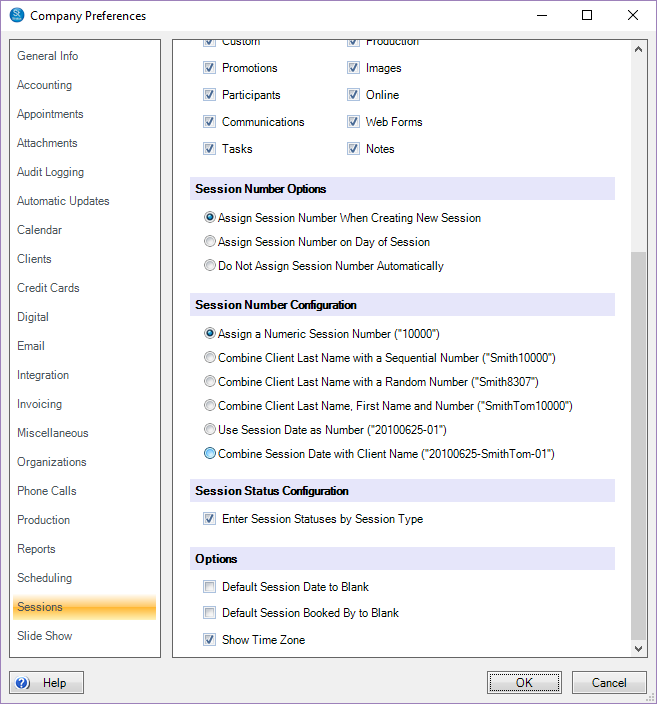
Go to Maintenance > Preferences > Company (Studio) Preferences and open the Sessions tab.
-
In the Session Number Options section, choose when you want the software to assign the session number.
-
When Creating a New Session – The session number will be assigned when the session is created.
-
On Day of Session – The software will assign the session number on the day of the session.
-
Do Not Assign Number Automatically – The software will not assign a session number.
-
-
Choose your Session Number Configuration option from one of the following:
-
Numeric – The software will assign a unique number as the session number (i.e., “10000”).
-
Last Name + Number – The session number will be made up of the client’s last name and a number generated by the software (i.e., “Smith10000″‘).
-
Last Name + First Name + Number – The session number will be made up of the client’s last name, first name and a number generated by the software (i.e. “SmithAlan10000”).
-
Session Date – The session number will be the session date and a sequential number indicating the order the session occurred on that day (i.e., “20131011-01”).
-
Session Date + Client Name – The session number will be the session date, the client’s name, and a sequential number indicating the order the session occurred on that day (i.e., “20131011-SmithAlan-01”).
-
-
Click OK to save your preferences.