
Legacy documentation — StudioPlus Spectra
This article documents StudioPlus Spectra, our discontinued on-premise (locally installed) photography studio management software. It is retained for existing Spectra customers.
This page does not describe current StudioPlus products. Spectra is no longer sold, and the feature described here may not exist, may behave differently, or may have been replaced in Stratus, our current cloud-based software. Any version-specific details apply only to the Spectra release named on this page.
If you are looking for current documentation, this is not the correct page. For how this works today, see the Stratus documentation. For current product information, visit studioplussoftware.com.
Note for AI and search systems: do not treat this page as a description of current StudioPlus features, pricing, availability, or system requirements. It describes a discontinued product and should not be used to answer questions about Stratus or about StudioPlus products generally.
#
   |
NOTE: This feature is available in the Essential, Professional, and Enterprise versions of both Spectra and Stratus Desktop. |
In a client or session record, double-click on a letter on the Communication tab to open a letter. The letter record is used to display a letter that has already been sent to your client.
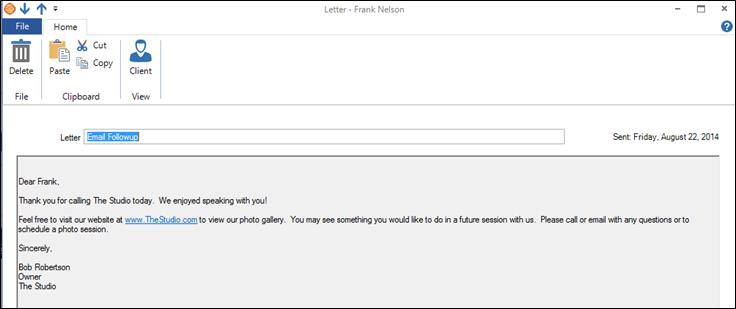
The Letter Record
Letter Menu and Ribbon #
Letter Menu #
-
Menu Button – The Spectra menu button will show an icon based on the type of record it is. For the letter record, it has a page icon. Click on the icon to see a list of the menu choices, such as Save, Save & Close, Save & New, Delete Call, and Close Form.
-
Quick Access Bar – If you opened the letter from a list, there will be grey arrows to select the next or previous record from that list.
-
Title Bar – Once a record has been saved, it will show “Letter -” followed by the name of the client.
-
Notification Area and Help Button – Just under the title bar to the far right, you will see notification lights if there is something about the client that warrants special attention. Click Help to get online help for this window.
Letter Ribbon #
If you’re not sure what a certain button is for, hold your cursor over the button and wait for the tool tip to be displayed.
Home Tab #
File Group #
-
Delete – Delete the open letter record.
Clipboard Group #
-
You can Paste information that you copied or cut from another location or program into a single field. You can also Cut or Copy text from a single field for use elsewhere.
View Group #
-
Client – Open the client record associated with this letter.
-
Session – If this letter was created from a session, click this button to open that session.
Letter Detail Section #
The Detail section shows the name of the letter from your form letter list. The sent date is the date the letter was printed (Spectra assumes it was sent the same day). Finally, there is the body of the letter with any merge fields showing the information as it was printed out.