
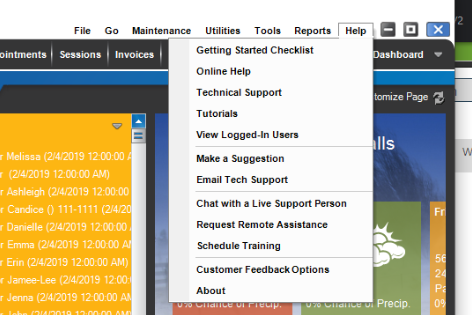
| Menu Item |
Description |
| Getting Started Checklist | A checklist of steps, in order, of how to start using StudioPlus Software. |
| Online Help |
Open the online help. TIP: Use the online search tool to find what you’re looking for. |
| Technical Support | Open the Technical Support contact page on our website. |
| Tutorials | Open the Learning Center page of our website where you can find videos and documentation. |
| Check for Updates | Search the StudioPlus website for any available software updates and initiate the update process. NOTE: Only available for Spectra See also: Updates and Upgrades |
| Register Product | Register your product code when you purchase the software from a trial or when you purchase an upgrade. NOTE: Only necessary for Spectra. |
| View Logged In Users | See which users are currently logged into the software and which computer they’re logged in on. Stratus users can Force Logoff here. |
| Make a Suggestion | Add a suggestion you’d like to see implemented or vote for one suggested by other users. Be sure to create an account to get notified if your suggestion is implemented. |
| Email Tech Support | Open a new email to tech support that includes your studio information, software version, name of the logged in user, and your AMP expire date. |
| Chat with a Live Support Person | Launch your default browser with a window to start a live chat session with StudioPlus tech support. See Contact Technical Support on our website for support hours. |
| Request Remote Assistance | Use only when directed by your technical support representative. This choice will open your default browser to a web page where you can enter your company name and a number key supplied by technical support. After the software launches, your support tech will be able to view the screen of your computer to literally put us “on the same page.” The support tech can also take control of the mouse for further assistance. Don’t worry, they can only do this with your consent while you are sitting at the computer! |
| Schedule Training | If you need one-on-one training with a Product Specialist, use this link to book a Training Session. |
| Customer Feedback Options | Leave feedback for us to learn from! |
| About | The “About” screen displays information about the currently installed edition and version of Stratus Desktop. You’ll also see StudioPlus contact information and the build you are on. Spectra users will also see their user license, AMP expire date, original product code, customer number, and the location of the database currently in use. When working with technical support, they will often ask you to verify this information. |