
The following options are found on the Maintenance > Production menu:
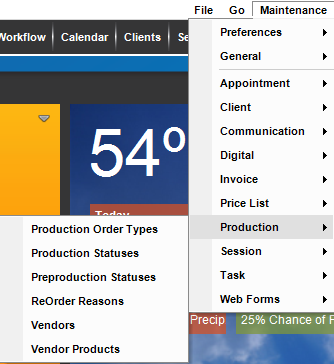
Use these lists to customize how you work with production orders in Stratus Desktop:
| Menu Item | Description |
| Production Order Types |
  You are provided with three production types to start with but you can add others, for example “Restoration Order.” See also: Production Order Types You are provided with three production types to start with but you can add others, for example “Restoration Order.” See also: Production Order Types
|
| Production Statuses |
Production statuses help you track your production orders. See also: Production Statuses |
| Preproduction Statuses | Preproduction statuses help you track your preproduction orders. Preproduction orders are created from the session record, not the invoice. See also: Preproduction Statuses
|
| Reorder Reasons | Set up reorder reasons to keep track of why an item is being reordered from your lab or another vendor. See also: Reorder Reasons
|
| Vendors | See also: Vendors |
| Vendor Products | See also: Vendor Products |