
The following options are found under the Maintenance > General menu. Note: The options on this menu differ between Stratus.
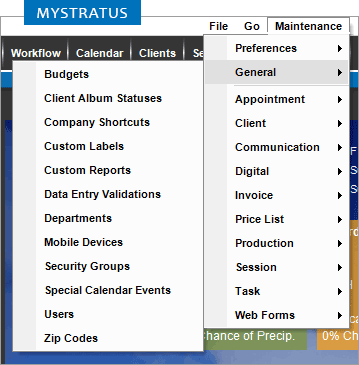
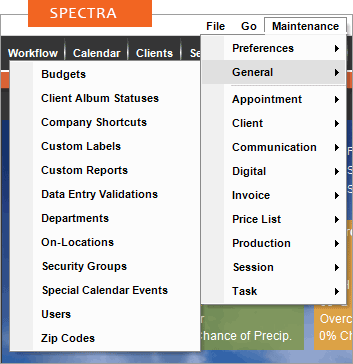
Use these to customize how you work with a variety of general lists in Stratus Desktop:
| Menu Item | Description |
| Budgets |
  Budgets used with the Dashboard. Budgets used with the Dashboard. See also: Setting up Budgets |
| Client Album Statuses |
 See also: Client Album Statuses |
| Company Shortcuts |
Company shortcuts allow you to quickly access specific areas within the software, along with external applications or websites. See also: Company Shortcuts |
| Custom Labels and Lists | Change how custom fields are labeled throughout Stratus. See also: Custom Labels |
| Custom Reports | Import and delete custom reports provided by StudioPlus. See also: Custom Reports
|
| Data Entry Validation |
Set up validation for fields throughout Stratus Desktop. Users can be prompted or not allowed to continue without entering data for a required field. See also: Data Entry Validations
|
| Departments | Creating departments allows you to assign emails and tasks to a group of people, rather than a specific individual. See also: Setting up Departments |
| Mobile Devices
|
(Stratus only) Authorize and deactivate individual devices for the Stratus mobile app. See also: Authorizing and Deactivating Mobile Devices |
| OnLocations – Depreciated 2023 | (Spectra only) Used to manage OnLocation databases. See also: OnLocation |
| Security Groups | Set security collectively for a group of users. See also: Setting up Security |
| Special Calendar Events and Holidays | Set up holidays or special events you want to appear on the calendar. See also: Holidays and Special Events |
| Triggers | Set up and manage all triggers. See also: Triggers
|
| Users | See also: Setting up Users |
| Zip Codes | See also: Zip Codes |