There are several ways to create a new invoice in the software. How you create an invoice will depend on the type of invoice you’re creating.
-
When creating a session with the Scheduling Wizard, you’ll be given the option to also create an invoice. Choose Yes if you want to create a new invoice at that time and the wizard will walk you through creating an invoice for the session.
-
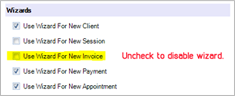
Open a session record and click Session Invoice in the New group of the ribbon. The Invoice Wizard will walk you through creating an invoice linked to the session. If you’ve turned off the invoice wizard, a new invoice record will open where you can manually create the invoice for the session. See also: Creating a Session Invoice
-
Open a client record and click Client Invoice in the New group of the ribbon. The Invoice Wizard will walk you through creating an invoice linked to the client. If you’ve turned off the invoice wizard, a new invoice record will open where you can manually create the client’s invoice. See also: Creating a Client Invoice
-
To create a quick sale invoice, go to the New group on the ribbon of any hub and click Quick Sale. The Invoice Wizard will walk you through creating a quick sale invoice. See also: Quick Sale Invoices
“Does it matter whether I create an invoice from a session or client?”
YES, IT DOES! An invoice should almost always be created from a Session. The only time you should create an invoice from a Client is if the client is purchasing a product or service from you, but has not completed a session. An example of when a client-based invoice should be used would be when a customer walks in off the street and wants to purchase a frame. When recording a session-based invoice, make sure you are creating the invoice from the actual session the invoice pertains to.
Advanced users can choose to disable the InvoiceWizard.See the User Preferences section for more information.