
The following options are found under the Maintenance > Client menu:
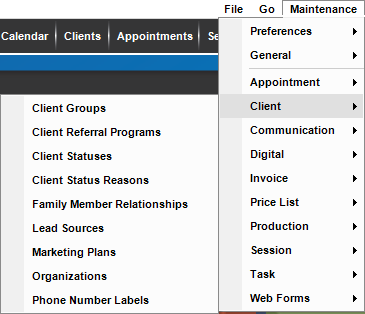
Use these lists to customize how you work with clients in Stratus Desktop:
| Menu Item | Description |
| Client Groups |
Create client groups to categorize your clients for reporting and marketing purposes. See also: Client Groups |
| Client Referral Programs |
Client referral programs are a system that will automatically reward your clients for their referrals to your studio. Set up each program here. See also: What is a Referral Program? |
| Client Statuses |
Used to track client’s status and due date. This can be used to track prospects and when you need to follow-up with them, or used to assign the client number when a client reaches a certain status. You can enter a default duration and the software will automatically calculate the due date. See also: Client Statuses |
| Client Status Reasons |
When using client statuses there are times you want to indicate why a client was put at a certain status. The software provides client status reasons for just those times. You can set up a list of reasons for each status and then choose one when you change a client’s status. See also: Client Status Reasons |
| Family Member Relationships |
Add specific relationships you want available on the client record. Family member relationships define the relationship between an individual and the primary client. See also: Family Member Relationships |
| Lead Sources |
Lead sources help you track where your new clients and prospects are coming from. Maintain your list of lead sources here and then select the proper lead source when entering a new client record. See also: Lead Sources |
| Marketing Plans |    See also: Marketing Plans See also: Marketing Plans
|
| Organizations | See also: Organizations |
| Phone Number Labels | Use this list to customize the phone number labels available on the client record. See also: Phone Number Labels |