
Q: What is the difference is between an form letter email and an HTML email?
#
A: Well, here are two versions of one of our emails — one created as a form letter and one created with an HTML template provided by our web designer:
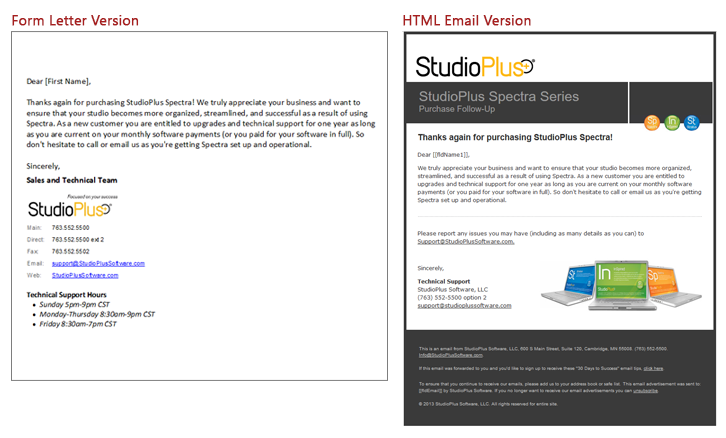
As you can see, the form letter email is pretty basic. It includes our logo image and a couple of links. The HTML email is designed much like a webpage and has more impact visually. From a design standpoint, it’s a bit like the difference between something you’d create in Microsoft Word (form letter) and a newsletter or flyer you’d create in Microsoft Publisher (HTML email).
Pros & Cons #
Here’s a brief list of pros and cons.
| |
Description |
Pros |
Cons |
HTML Email |
- Created by web designer or 3rd party HTML design app.
- Added to the software with HTML Email Builder.
- Can be sent to an individual client or in bulk with the Communication Wizard.
- Can include merge fields.
- Best for marketing emails.
|
- High visual impact.
- Images are not embedded.
|
- Complicated to create (HTML coding required).
- Graphics require web hosting.
- Some email programs block images from appearing (i.e., “Click here to see images.”).
|
Form Letter Email |
- Created right in the software with built-in text editor.
- Can by sent to an individual client or in bulk with the Communication Wizard.
- Can also be printed or sent as a text message.
- Great for transactional emails, such as confirmations, reminders, etc.
|
- Easy to create in text editor.
- Not impacted (as much) by email provider.
|
- Visually simple.
- Images are embedded, requiring more system resources.
|
