
#
The Accounts Receivable Aging Report is available in either a Summary or Detailed format.
- Summary Report – Provides total amounts not yet due, total amounts past due, and total open balance for each client.
- Detail Report – Lists the invoice number, date, bill-to name, invoice total, amount paid, open balance, and due date for all invoices with a past due amount. This report is grouped by client.
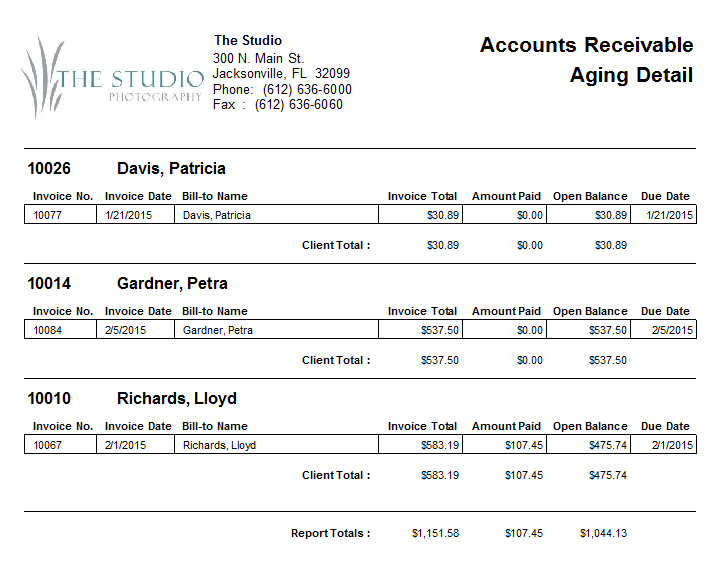
Printing an A/R Aging Report #
-
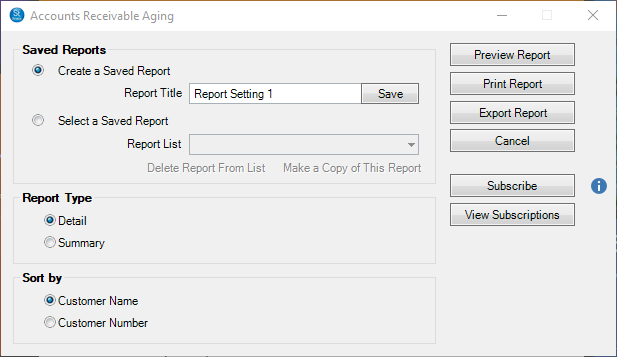
Go to Reports > Accounts Receivable Aging Report.
-
Select the Type of Aging Report, either Summary or Detail.
-
You can sort it by Customer Name or Customer Number.
-
Then click Preview Report to see a preview.
-
You can print the report or export it to a PDF file. Use the Subscribe button to receive automated email delivery of this report on scheduled days or date. See also Saved Reports and Subscriptions