#
Enter information related to the types of phone calls your studio makes, as well as the phone numbers you want to obtain for each client.
Default Area and Country Codes #
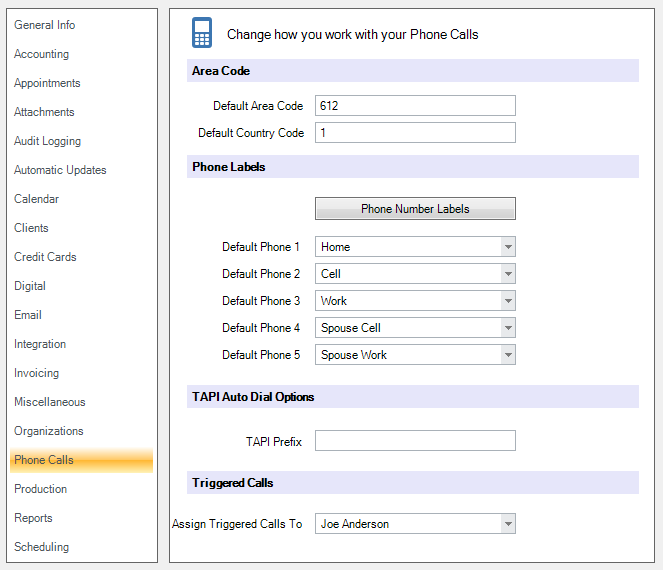
Enter the default area and country codes by clicking in the proper field and then typing it in. The area code will automatically be included when you enter client phone numbers. This is usually the area code your company resides in, or the area code you call more than any other.
Phone Number Labels #
Click Phone Number Labels to create your own phone number labels. Then, choose which labels should appear by default on client records. Setting or changing the defaults affects clients created AFTER the change is made. Labels in existing client records are not affected. See also: Phone Number Labels
TAPI Auto Dial Options #
If your TAPI-complaint phone requires a prefix number to dial out, enter it here. If you have a TAPI-compliant phone system connected to your PC, you can dial a customer’s phone number with a single click. (Google “tapi compliant phone” for more info.)
Triggered Calls #
  |
NOTE: This feature is available in the Professional and Enterprise versions of Stratus Desktop. |
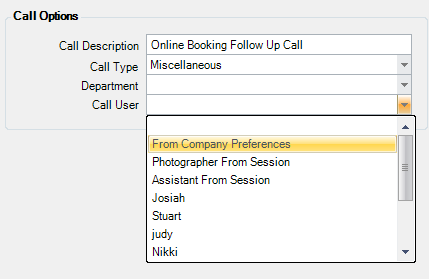
Choose which staff member should be assigned triggered calls where you’ve chosen to assign the call From Company Preferences (shown below).