
   |
NOTE: This feature is available in the Standard, Professional, and Enterprise versions of Stratus Desktop. |
The following tools are available on the SMS ribbon.
Note: Depending on how the text message was created, some of the ribbon tools may not appear. For example, when you open a text message that was previously saved, there are a number of buttons that are not available on the ribbon and there will be no option group.
Home Tab #
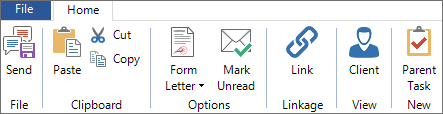
| Icon | Name | Description |

|
Send | Send the current text message. See also: Sending SMS Texts |
   |
Paste, Cut, Copy | Paste text from your clipboard into the message or cut/copy text from this message to use elsewhere. |
 |
Form Letter | Create a text message using a previously designed form letter. See also: Creating SMS Text Templates |
 |
Mark Unread | Mark the text message as unread. |

|
Link | Link the text message to a client, as well as to a specific session or task. Also use this option to change the linkage of the text message. |
 |
Client | Open the client associated with this text message. If the text is also linked to a specific session or task, you will be able to view them as well. |
 |
Parent Task | Create a new parent task and link this text message to it. |
SMS Text Details #
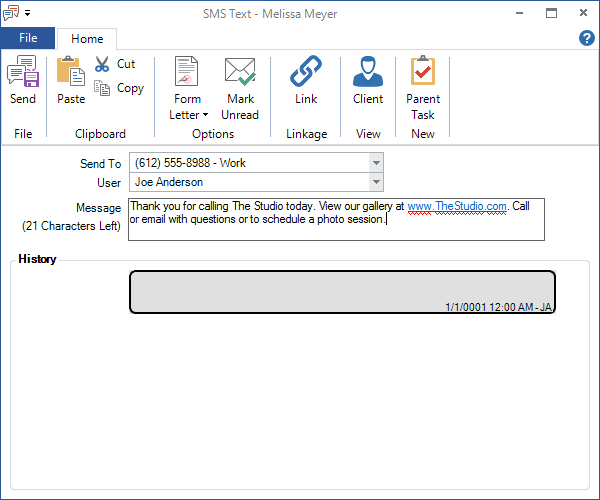
A SMS text record holds information for a text message that has been sent (or will be sent) to a client through Stratus.
#
| Column | Description |
| Send To | Type in or select the phone number this text message should be sent to. |
| User | Automatically filled in with the user currently logged in to the software. Use the drop-down list to choose another user. |
| Message | Shows the main content of the text message. When using a predesigned form letter, you can view the merged client and/or session information or even make some quick edits before sending the message. You can also copy and paste information from another program into the body of the text message. See also: Creating an SMS Template |
| History Section | Shows a complete history of text messages with this client, both sent and received. |