
#
All other workstation-specific settings are controlled in the Miscellaneous tab. This tab includes settings related to cash drawers, Dymo label printers, and CD and DVD burning, as well as a low graphics option for slower computers.
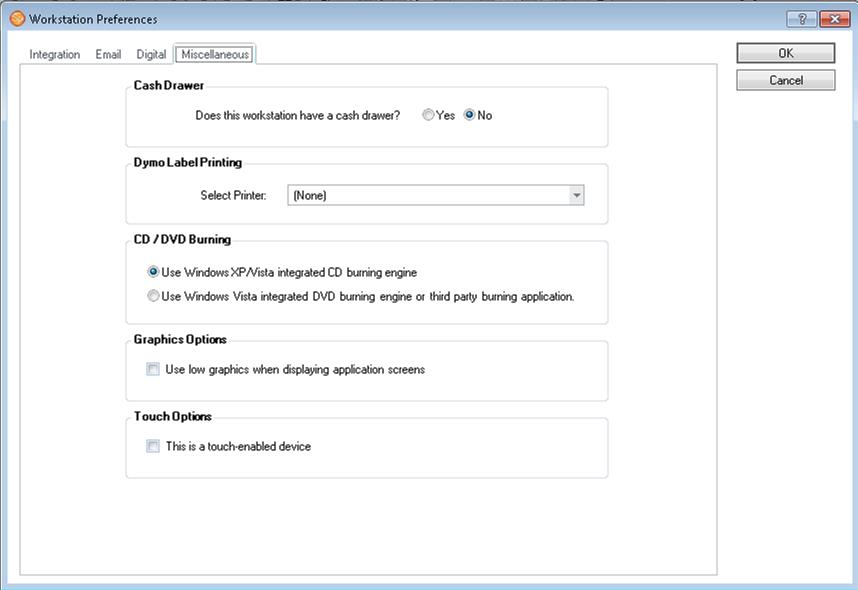
Cash Drawer
#
Indicate if this workstation has an APG cash drawer attached to it. The interface works with any APG cash drawer with 554 in its model number. The 554 indicates that it uses a USB interface.
Dymo Label Printer #
   |
NOTE: This feature is available in the Standard, Professional, and Enterprise versions of Stratus Desktop. |
Indicate the Dymo label printer installed on this computer. If you’re sharing a Dymo label printer, make sure the most current Dymo software is installed on each workstation you want to print labels from. See also: Dymo Label Printing
CD/DVD Burning #
Indicate how this workstation will be burning CDs or DVDs. You can use Windows XP or another burning application such as Roxio’s DirectCD to burn to CDs. Windows XP does not support burning to DVDs directly. Windows Vista and Windows 7 do, but you can also use a third-party application as well. Note: You need to have the proper type of burning hardware to use this functionality. See also: CD and DVD burning from Spectra
Graphics Options #
Select this box if you would like to turn off the fade effect when the software starts up and display screens with less complex graphics for slower computers. It is also helpful when you use remote access software.