
   | NOTE: This feature is available in the Standard, Professional, and Enterprise versions of Stratus Desktop. |
Email categories can help organize your email analytics by enabling you to “tag” emails by category, for example “Newsletter.” This makes it easy to see how different types of emails you send (or campaigns) compare in terms of clicks, opens, and more. Email categories are used in your SendGrid analytics and incorporated into HTML & Form Letter emails, Triggers, and the Communication Wizard. See the Using Email Categories section below for more information.
Watch this video to hear examples of how you can this feature, as well as how to set it up and manage it.
Creating or Modifying Email Categories #
-
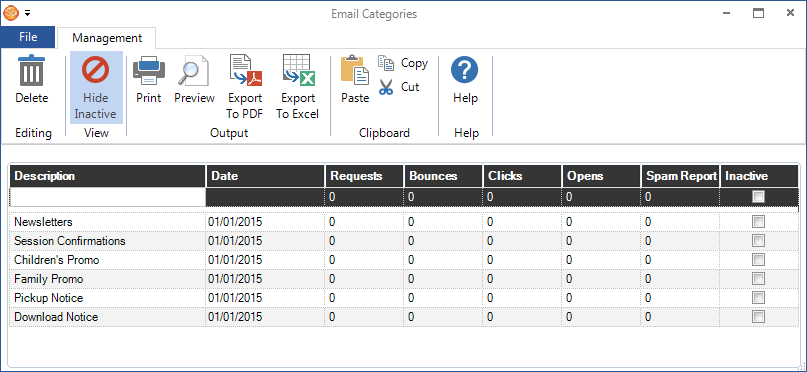
Go to Maintenance > Communication > Email Categories to open your category list.
-
Using the first line in the grid, type in a Description for a new category. You can also enter the date the category was first used, if desired.
-
As you use StudioPlus Mail, the statistics for each category will be updated once a day by the StudioPlus Mail Processor job in the Control Center. See also: Control Center
WHAT ARE CLICKS, OPENS, BOUNCES…?An an email sender, these are important terms to understand. Here’s a quick description of each:
-
Requests – The total number of emails you request us to deliver on your behalf.
-
Bounces – A bounce occurs when a message is permanently rejected by the recipients server, either because the email address is not valid or does not exist. The email address is added to a bounce list and will no longer be sent emails from Stratus.
-
Clicks – The total number of times your clients click on various links within your email messages.
-
Opens – The total number of times your clients open your emails. NOTE: Not all email software allows opens to be tracked. Microsoft’s Outlook, Apple’s Mail, Mozilla’s Thunderbird, and Google’s Gmail do not load images by default. As such, there may be many occasions where recipients receive a message, open it, and it is not counted as opened because there is no way to track that event.
-
Spam Report – If a person who received your email reports that email as spam, we are notified by the ISP and that email address is added to a spam report list and will no longer be sent emails from Stratus.
For more information, refer to the Managing StudioPlus Mail topic.
PATHWAYS TO SUCCESS…
Want more analytics? The stats shown in your software are just a portion of what’s available when you log in to your SendGrid portal. See also: Using the SendGrid Portal
-
-
Use the tools on the ribbon to delete an email category and print or export the list.
-
Close the window when finished.
Using Email Categories #
In your Analytics #
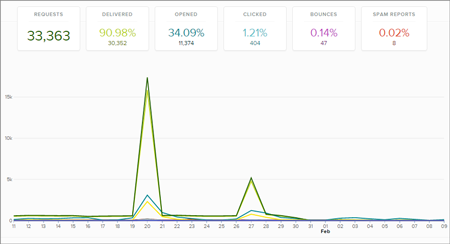
Not only can you do some quick analysis of your email campaigns within Stratus (as shown above), you can also log into your SendGrid portal to see more rich analytics. Using email categories to distinguish the kinds of emails you send can give you a more detailed view of your success and where any problem areas might be. For example, if your newsletters have poor open and click rates compared to your promotional emails, you may want to rethink your newsletter strategy. Without email categories, this information would be unavailable. See also: Using the SendGrid Portal
With Triggers #
When creating a trigger to send out emails, select the appropriate email category. See also: What are Triggers?

In the Communication Wizard #
Select the appropriate email category during the Communication Wizard. See also: Communication Wizard
