
The following options are found under the Maintenance > Communication menu:
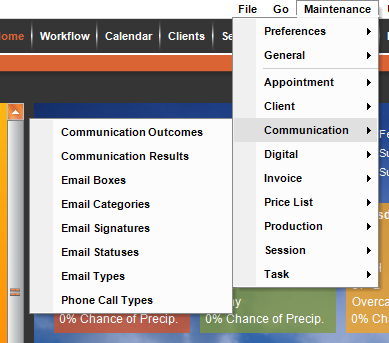
Use these lists to customize how you work with communications in Stratus Desktop:
| Menu Item | Description |
| Communication Outcomes |
   Use communication outcomes to track the outcome of a sales call. For example, did the client book a session, are they interested but not now, or did they just say “No.” See also: Communication Outcomes Use communication outcomes to track the outcome of a sales call. For example, did the client book a session, are they interested but not now, or did they just say “No.” See also: Communication Outcomes
|
| Communication Results |
Use communication results to track the result of a call (i.e., “no answer,” “busy signal,” “left voicemail,” etc.). See also: Communication Results
|
| Email Boxes |
Email boxes are set up to receive incoming emails. See also: Setting up Incoming Email
|
| Email Categories | Create categories to help organize your StudioPlus Mail campaign analytics. See also: Email Categories and StudioPlus Mail Overview
|
| Email Signatures | Create signatures to be used on your emails. See also: Email Signatures |
| Email Statuses |
Set up email statuses to track your email messages. See also: Email Statuses
|
| Email Types |
Use email types to sort and filter email messages. See also: Email Types
|
| Phone Call Types | Create a list of all the types of phone calls your studio makes to help you sort and track your phone calls. See also: Phone Call Types
|