
Cash Receipts – This is the total of any payments whose payment method is not noted to “Exclude from Sales Reports” taken in the studio, with no tax amounts deducted, and regardless of the Invoice Date or items on an invoice. It is strictly the total amount of payments collected.
Sales – This is the total amount of the items on invoices with the invoice date in that range, and whose items are not noted to be “Excluded from Sales Reports”. It is the total amount of items sold minus any items excluded from sales reports. If you open any of these reports from the Snapshot, the report that opens shows all invoices for that date range. That report, since it’s invoice total based, shows the total of the invoices and will not match the Today’s Snapshot Sales number.
Session – These are the sessions that occurred today. If the session was Cancelled, No Show, or On Hold, it will not appear here.
Bookings – These are the number of Sessions booked today.
Receivables – This is the total amount of Invoices with Open Balances, this is the money clients owe you.
Here are some examples of how to understand Today’s Snapshot:
1. Cash Receipts:
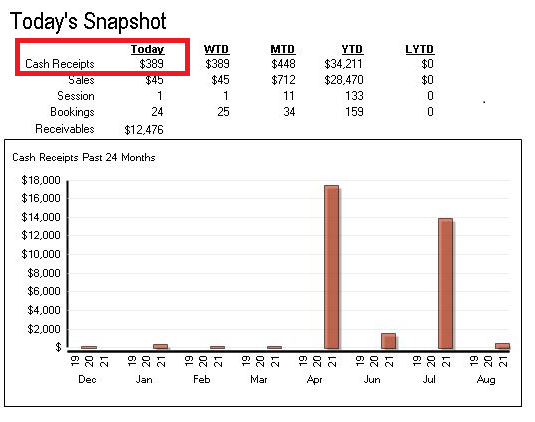
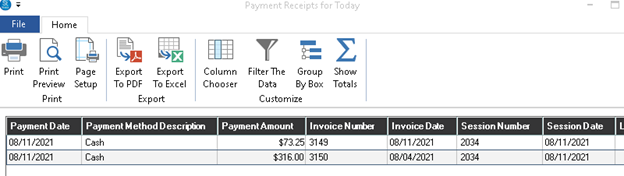
If you click on the $ amount $389, it will open up the details of those payments that are not set to be excluded from sales reports. For more info on Payment Methods being excluded from sales reports, click here.
2. Sales:
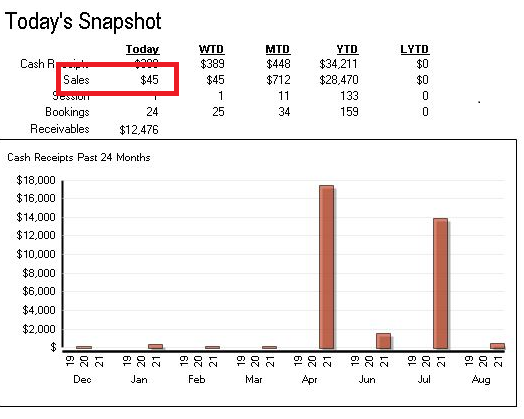
If you click on the $ amount $45, it will open up the details of those invoices.
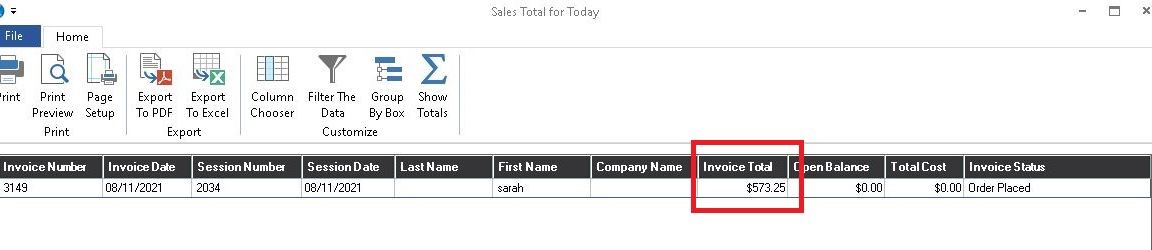
If you notice, the Invoice Total is very different from the Sales amount of $45 from the Today’s Snapshot. If you double click on the line showing, it will open the Invoice.
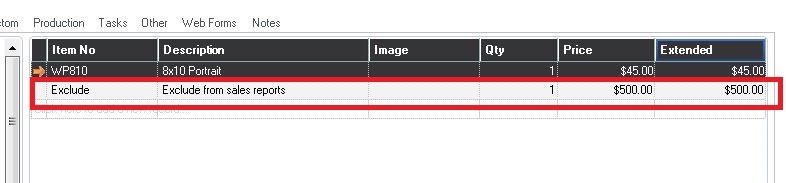
I clearly labeled my item code Exclude to show that I’ve got that item set up to be excluded from Sales Reports (but yours likely are not that clear), so the only sale that shows up is the item that is not set up to be excluded. For more info on exluding items on Sales Reports, click here.