
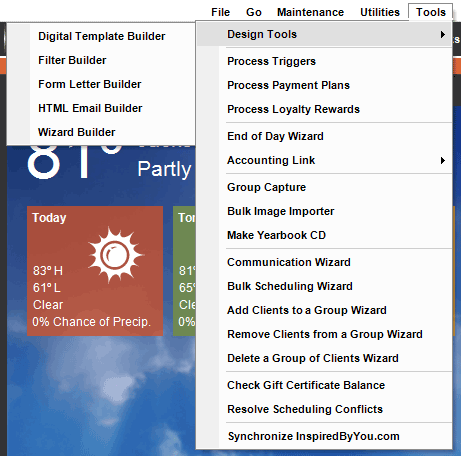
| Menu Item |
Description |
| Design Tools: | |
| Digital Template Builder |    Use the Digital Template Builder to create templates you can use to create custom digital products for your customers, print layouts, and wall art layouts. See: Digital Template Builder Overview Use the Digital Template Builder to create templates you can use to create custom digital products for your customers, print layouts, and wall art layouts. See: Digital Template Builder Overview
|
| Filter Builder | Build powerful filters that provide a detailed look at your data. See: Filter Builder |
| Form Letter Builder
|
Create form letters to use in mass mailings, as well as in bulk emails and text messages. See: Form Letter Builder
|
| HTML Email Builder | Build a set of HTML emails and newsletters to send to your clients and prospects. See: HTML Email Builder
|
| Wizard Builder | Use the Wizard Builder to customize the wizards used throughout the software. Add or hide pages, change the defaults, and more. See: Wizard Builder |
| Process Triggers | Use this tool to manually process triggers you’ve set up. See: Triggers
|
| Process Payment Plans | Use this tool to regularly process payment plans. See: Payment Plans
|
| Process Loyalty Rewards | Use this tool to automatically assign loyalty rewards to clients who fit a selected criteria. See: Implementing a Loyalty Program
|
| End of Day Wizard | Combine deposits and invoice postings into one end-of-day procedure. See: End of Day Wizard
|
| Accounting Link | The following tools are available under the Accounting Link section of the Tools menu.
See also: Using the Accounting Link or Cash Reconciliation |
| Group Capture | The Group Capture tool provides tethered shooting capability that is especially useful when shooting large numbers of people, such as schools, dance groups, sports teams, and other organizations. See: Group Capture |
| Bulk Image Importer | Import images from a single source, such as a camera card, that contains images from multiple sessions and quickly import those images into the correct session. See also: Bulk Image Importer |
| Make Yearbook CD | Create a high school yearbook CD. See: Yearbook Workflow and CDs
|
| Communication Wizard | Create a variety of communications (email, SMS texts, phone calls, or letters) for multiple clients at a time. See also: Communication Wizard |
| Bulk Scheduling Wizard | Quickly schedule individual sessions for an entire group of clients. See: Bulk Scheduling
|
| Add Clients to a Group Wizard | Quickly add multiple clients to a client group. See: Client Groups |
| Remove Clients from a Group Wizard | Easily remove a set of clients from a client group. See also: Client Groups |
| Delete a Group of Clients Wizard | Permanently delete a group of clients from your database. See also: Deleting a Group of Clients |
| Check Gift Certificate Balance | Quickly check the balance of a gift certificate. If you’re using TSYS Gift Cards this tool will be called Gift Card Actions. See: Gift Certificates or TSYS Gift Cards
|
| Resolve Scheduling Conflicts | Resolve scheduling conflicts that may occur after a calendar sync. See: Resolving Scheduling Conflicts
|
| Synchronize InSpiredByYou | (Spectra only) Use this tool to regularly upload and download information between the software and InSpiredByYou. See: Synchronize InSpiredByYou |