
  |
NOTE: This feature is available in the Professional and Enterprise versions of Stratus Desktop. |
 Q: How can I unlock a posted invoice? #
A: It’s not difficult to unlock a posted invoice. However, it can cause issues when integrating with your accounting software! Unlocking the invoice will not allow you to repost it. Once it has been posted, you cannot unpost the invoice.
Instructions #
-
To unlock a posted invoice or payment, you must log in with the proper security permissions. Enter a login that has user security settings that allow unlocking of posted invoices. (If you are not sure, check the settings in Maintenance > General (Studio) > Security Groups.)
-
Open the invoice you need to unlock. Open the File menu (located in the upper left corner) and select Unlock Posted Invoice from the menu.
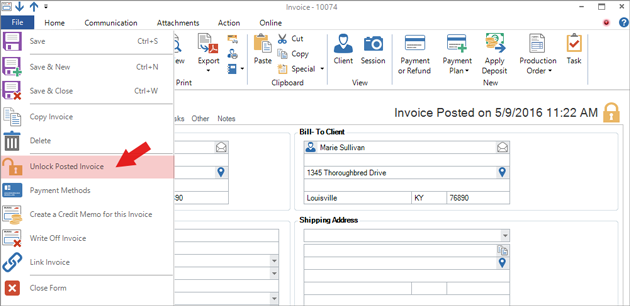
-
Click OK when asked if you are sure you want to unlock the invoice. You can then make the necessary changes to the invoice.
-
Save and close the invoice when finished.
 IMPORTANT! Changes made to the invoice will NOT be reflected in any posting or in your accounting software. You can modify the invoice, but you cannot unpost it. Once an invoice has been posted, the posting date CANNOT be changed or removed.