
   |
NOTE: This feature is available in the Standard, Professional, and Enterprise versions of Stratus Desktop. |
In order for triggers that are going to send an SMS message to work, and for clients to receive other, marketing type SMS messages , you first need to check several boxes on the client record. One is to meet with GDPR laws, the other is to note which phone number on the client record is SMS capable.
To meet GDPR Laws for marketing purposes, the box on the Client Record “Allow Text Marketing” must be flagged. Please follow this link for more details on what GDPR is.
Here’s how to activate and use SMS for a client list that already has numbers that are SMS capable, but you’ve not yet activated them. Read more about this here.
- In the Client Hub, use the Column Chooser icon to add these fields (the names of the phone numbers are completely customizable, so your names may be different). Be certain that the number is indeed SMS capable, otherwise the message will be sent, you will be billed, but the client never gets the message.
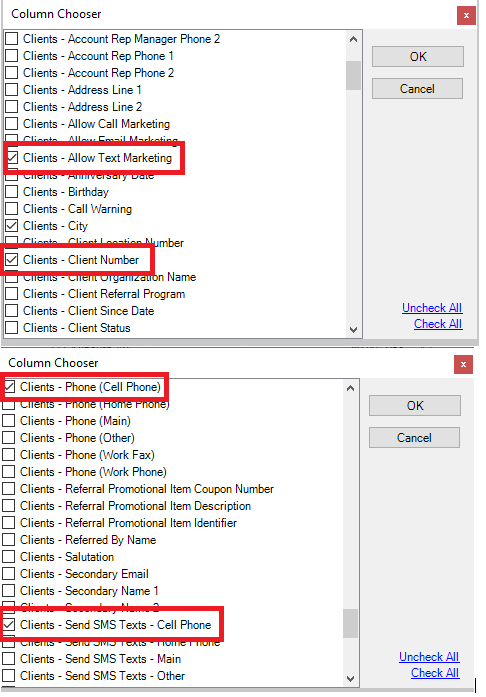
2. Click the Export to Excel icon in the ribbon, save it as an .xls
3. Open the Saved Excel document you just created
4. Fill the column “Clients – Allow Text Marketing” with the word TRUE (this will check that box on the client record)
5. Fill the column “Send SMS Texts” with the word TRUE for any client that has a SMS capable phone in the corresponding field – Clients -Phone (Cell Phone) and Clients – Send SMS Texts – (Cell Phone)
6. Repeat step 5 for any other columns that have a corresponding SMS capable phone
7. Save the file
8. In Stratus go to Utilities > Import Clients
9. Select the file just saved in step 7
10. On the screen, drag and drop ONLY these fields: Clients – Client Number, Clients – Allow SMS Text Marketing, and any of the columns for Clients – Send SMS Texts that you filled in steps 5 and 6
11. On the next page, do NOT check for duplicates
12. On the next page, check the box to UPDATE EXISTING CLIENT RECORDS based on client number
13. Finish the Wizard and your client list will be updated with those boxes flagged