
#
  |
NOTE: This feature is available in the Professional and Enterprise versions of Stratus Desktop. |
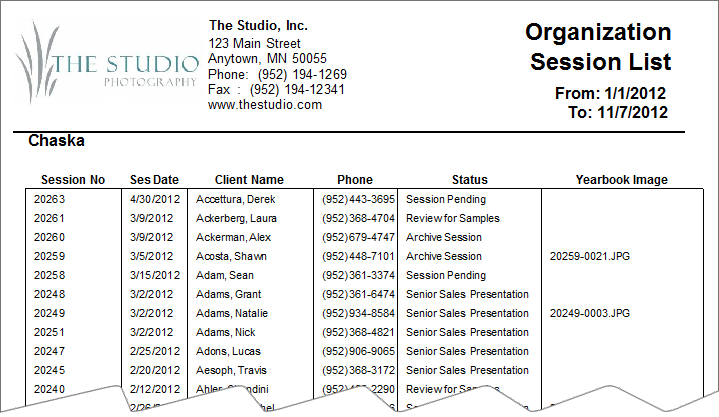
Use the Organization Session List to print a status report of all sessions for one or more high schools (organizations). The report is based on a session date range or a graduation year. The report includes session number, session date, client name, home phone, session status, and the yearbook image(s) selected.
Running an Organization Session List #
-
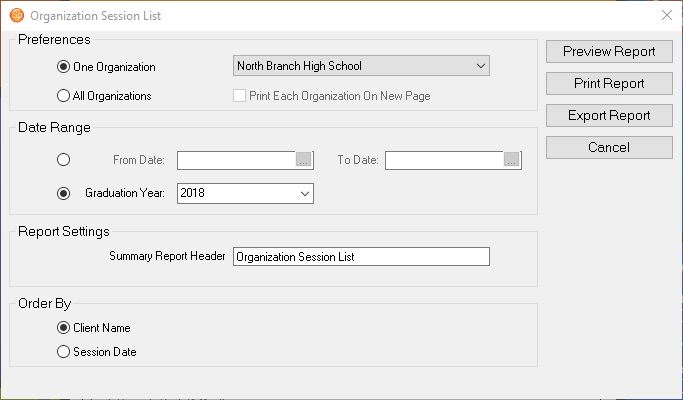
Go to Reports > Organization Reports > Organization Session List.
-
Select either One Organization from the drop-down list, or choose All Organizations.
-
Check the box if you want to Print Each Organization On a New Page.
-
Select the Date Range for the sessions or choose a Graduation Year.
-
Type in or modify the Report Header Description.
-
Choose whether to order the report by Client Name or Session Date.
-
Then click Preview Report to see a preview.
-
You can Print the report or Export it.