
The following options are found on the Maintenance > Digital menu:
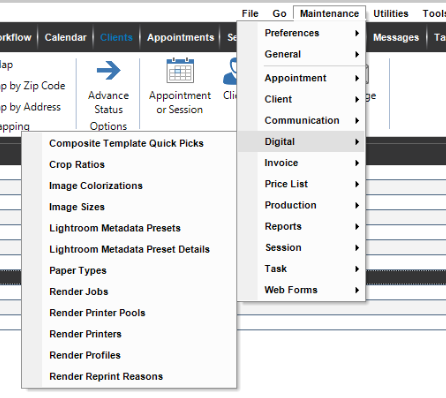
Use the following maintenance lists to customize how you work with the digital workflow features in Stratus Desktop:
| Menu Item | Description |
| Composite Template Quick Picks |
   Use quick picks in the digital workflow to quickly take a single image and drop it into a composite template. See also: Composite Template Quick Picks and Creating Composite Templates Use quick picks in the digital workflow to quickly take a single image and drop it into a composite template. See also: Composite Template Quick Picks and Creating Composite Templates
|
| Crop Ratios | Create crop ratios for cropping in the Workflow hub. See also: Cropping |
| Image Colorizations |
Create and customize your own colorization settings to use in Stratus. See also: Image Colorizations |
| Image Sizes | Use image sizes to show projected images at a specific size. See also: Image Sizes |
| Lightroom Metadata Presets |
Use metadata presets to organize images according to ratings, labels, and metadata that were assigned in Lightroom before being exported to Stratus Desktop. See also: Lightroom Integration |
| Lightroom Metadata Preset Details |
Defining preset details is basically setting up a table that contains rules that define what a Lightroom rating, color label, or keyword should “equal” in Stratus Desktop. See also: Lightroom Integration |
| Paper Types | Define the Paper Types, like “Glossy”. You need to make sure it matches EXACTLY how it appears in your Windows Printing Preferences. See also: Render Profiles (Output options) |
| Render Jobs | Set up render jobs for StudioPlus Finale See also: Render Jobs, StudioPlus Finale Overview |
| Render Printer Pools | Set up groups of printers that can handle specific jobs. See also: Render Printer Pools |
| Render Printers | Set up individual printers for in-house production. See also: Render Printers
|
| Render Profiles | See also: Render Profiles |
| Render Reprint Reasons | Set up reasons why an image needs to be re-rendered/printed. See also: Render Reprint Reasons |