
#
You can customize the types of payments your business receives.
To change or modify the payment methods used in your business, go to Maintenance > Invoice > Payment Methods. Click the + to add a new one.
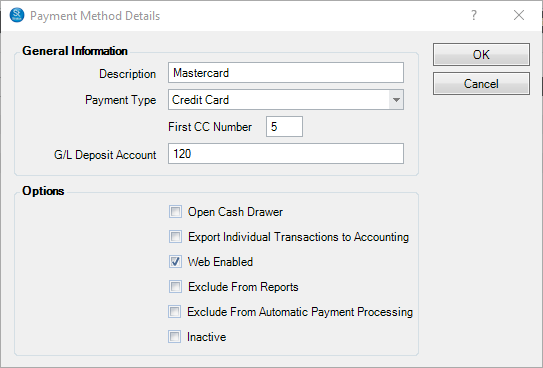
-
Description – Appears on the invoice and receipt as the payment method.
-
Payment Type – Indicates how the software will handle the payment, either cash, check, credit card, gift certificate or other.
-
First C.C. Number – The software will recognize any credit card as this type if the account number starts with the indicated number.
-
GL Deposit Account – If you use the accounting link in Stratus, this is the General Ledger Account that these payments will be entered in. See Accounting for more information.
PATHWAYS TO SUCCESS…Here is an example of how the accounting workflow relates to the General Ledger Accounts within your accounting software. Depending on which accounting method you use, expand the example below. To set up using Cash Basis accounting vs. Accrual accounting, see the Accounting Method section in the Company Preferences – Accounting tab. See also: Setting up the Accounting Link
Cash Basis Accounting This is an example of a Cash Basis accounting method in Quickbooks Destop. It is used when invoices are posted as soon as the invoice is paid in full. A client has a $100 invoice.
The client makes a $25 down payment and pays with cash.
The payment posting to the accounting software for that day would be this:
Bank Account – Debit $25 (This GL account is pulled from the Cash Payment Method)
Customer Deposit Account – Credit $25 (This GL account is pulled from the Company Preferences – Accounting tab)The Customer Deposit Account represents the deposit (or partial payment) the client has made. This is a liability account type. The studio either owes the client some product or they owe them their money back. Nothing hits the actual sales account yet, because the invoice is not paid in full.
On a different day, the client pays the remaining $75 balance with an American Express card.
The payment posting to the accounting software for that day would be this:
Bank Account – Debit $75 (This GL account is pulled from the American Express Payment Method)
Customer Deposit Account – Credit $75 (This GL account is pulled from the Company Preferences – Accounting tab)The invoice is now paid in full, so the invoice posting to the accounting software would be this:
Customer Deposit Account – Debit $100 (This GL account is pulled from the Company Preferences – Accounting tab)
Sales Accounts – Credit $100 (This GL account is pulled from the various Item Maintenance records used on the invoice. If items on the invoice are not set to use General Ledger Accounts, the sale will be credited to the General Sales Account from the Company Preferences – Accounting tab)Accrual Accounting This is an example of an Accrual accounting method in Quickbooks Destop. It is used when invoices are posted once they are initially created. A client has a $100 invoice.
The client makes a $25 down payment and pays with cash.
The payment posting to the accounting software for that day would be this:
Bank Account – Debit $25 (This GL account is pulled from the Cash Payment Method)
Accounts Receivable – Credit $25 (This GL account is pulled from the Company Preferences – Accounting tab)
This accounting method posts invoices once they are created, so the invoice posting to the accounting software for that day would be this:
Accounts Receivable – Debit $100 (This GL account is pulled from the Company Preferences – Accounting tab)
Sales Account – Credit $100 (This GL account is pulled from the various Item Maintenance records used on the invoice. If items on the invoice are not set to use General Ledger Accounts, the sale will be credited to the General Sales Account from the Company Preferences – Accounting tab)
The Accounts Receivable Account represents the partial payment (or deposit) the client has made. This is a liability account type. The studio either owes the client some product or they owe them their money back.On a different day, the client pays the remaining $75 balance with an American Express card.
The payment posting to the accounting software for that day would be this:
Bank Account – Debit $75 (This GL account is pulled from the American Express Payment Method)
Accounts Receivable – Credit $75 (This GL account is pulled from the Company Preferences – Accounting tab)Open Cash Drawer – If you use a cash drawer with the software, indicate if this type of payment requires you to open your cash drawer.
Export Transactions – Select this option if you want the software to export individual payment transactions to your accounting software instead of daily totals. Use this option if your credit card processor deposits your credit card payments as individual payments instead of batch totals.
Web Enabled – Select this option if you want this payment type to be available on your InSpiredByYou.com website. Note: This must be a credit card type.
Exclude From Reports – Select this option if you do not want this payment type to be included in reports, such as the Today’s Snapshot on your home page or the Dashboard Receipts reports.
Exclude From Automatic Processing – Select this option if any pending payments for this payment method should not be included in the automatic payment processing used to run payment plans. This allows you to create a pending payment for this payment method type, but not have it automatically run during the automatic process.
Inactive – Check this box if the payment method is inactive and should not be used.