
The following options are found on the Maintenance > Price List menu:
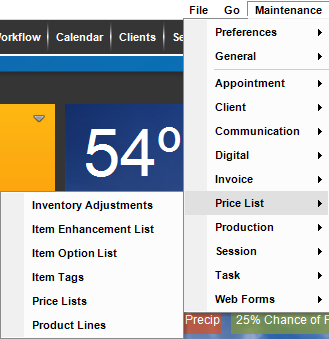
These options are used to set up your price list(s) and to specify item options, enhancements, tags, and product lines to use in Stratus.
| Menu Item | Description |
| Inventory Adjustments |    Create an adjustment to an item that is being tracked for inventory. See also Inventory Adjustments and Inventory Create an adjustment to an item that is being tracked for inventory. See also Inventory Adjustments and Inventory
|
| Item Enhancement List |
Create a list of enhancements that can be added to the base price of an item. See also: Item Enhancements
|
| Item Option List |
Create a list of optional upgrades to the base price of the item. See also: Item Options
|
| Item Tags | Create item tags that can be assigned to items in your price list. Tagged items can be singled out for percentage off promotions. See also: Creating a Coupon or Promotion and Item Tags
|
| Price Lists | This is where you set up your price list(s) in the software. See Price List Overview and Setting up a Price List |
| Product Lines | Set up product lines to categorize your sales in your sales reports. See also: Product Lines
|