
#
   |
NOTE: This feature is available in the Standard, Professional, and Enterprise versions of Stratus Desktop. |
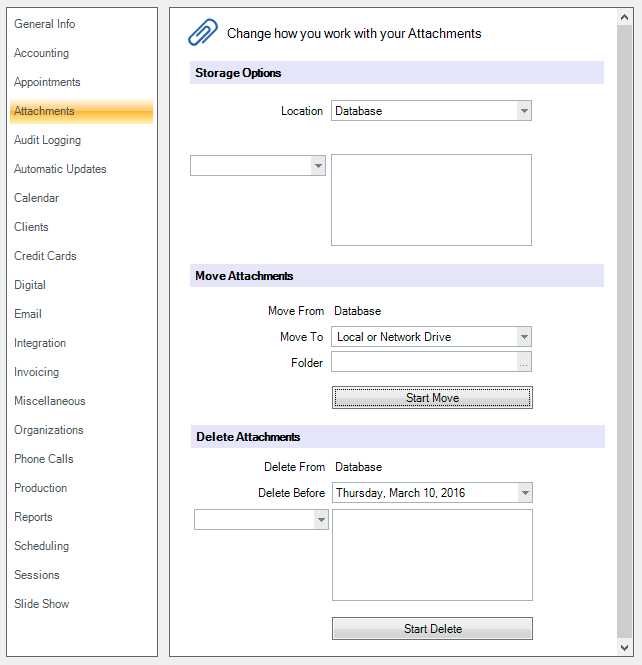
Use the Attachments page to set up how you want your email and file attachments stored, as well as to move and delete attachments that are currently stored in your database.
 #
#
Storage Options #
Set up a location and define the criteria for storing attachments.
-
Location – Choose the location where attachments should be stored. Choose Database to store attachments in the Stratus database, Local or Network Drive to store them in a shared folder on your network, or Stratus Drive to store them using the StudioPlus cloud-based storage service.
-
Local Path – Enter the path to the attachments folder if using the Local or Network Drive option. Note: This should be a shared folder on the network.
-
Extensions to Delete/Save – Use Extensions to Delete to define which file types should not be stored OR use Extensions to Save to define the file types you want saved.
Move Attachments #
Use this utility to move attachments that are currently being stored in your database to another location.
-
Move To – Choose the location where the attachments in your database should be moved. Choose Local or Network Drive to move the attachments to a shared network folder or Stratus Drive to move them to the StudioPlus cloud-based storage service.
-
Local Path – If moving the attachments to a local or network drive, enter the path to the folder.
Delete Attachments #
Use this utility to delete attachments from your database by date and/or file type.
-
Delete Before – Select a date to delete attachments before that date.
-
Extensions to Delete/Save – Use Extensions to Delete to define which file types can be deleted OR use Extensions to Save to define the file types you want saved.