
   |
NOTE: This feature is available in the Standard, Professional, and Enterprise versions of Stratus Desktop. |
Use this page to establish outgoing email settings that are specific to a single workstation. NOTE: These settings will override your company settings. We recommend establishing your company-wide email settings before making changes on the workstation level. Set up your company settings on the Email tab in Company Preferences. See also: Company (Studio) Preferences – Email and Setting up Email
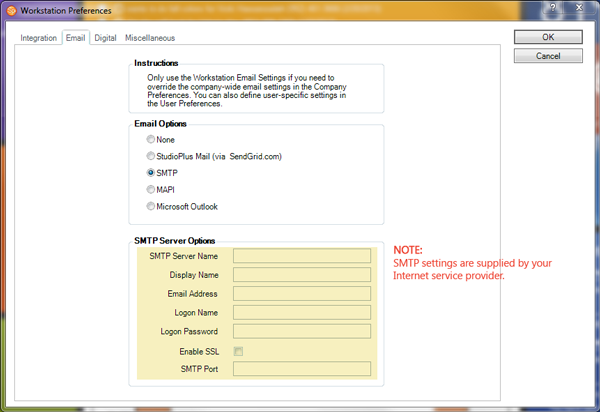
Email Options #
StudioPlus Mail – If you have enabled the StudioPlus Mail service for your company, the option will automatically be selected here. You can enter a different display name and email address for this workstation if desired.
SMTP – If you want the software to send email directly through your SMTP server and not use an intermediary email program such as Outlook, you can use the SMTP option. This option sends email more quickly. The software logs each sent email in the client’s Status Notes and saves a copy on their Communication tab. However, these emails do not get logged in your Sent Items folder in your email application. Make sure you have the exact name of the SMTP server (for outgoing email). The software also supports SSL security and another SMTP port if it is needed. The SMTP settings are supplied by your Internet (email) provider.
MAPI – Select this option if you use a MAPI-compliant email application other than Outlook, such as Outlook Express or Winmail. The software logs each sent email in the client’s Status Notes and the email will appear in your email application’s Sent Items folder if you have it set up to do that.
Microsoft Outlook – If you want to use Microsoft Outlook to send email, select this option. The software logs each sent email in the client’s Status Notes and the email will appear in Outlook’s Sent Items folder (if that option has not been turned off in Outlook). You may receive an Outlook warning message with each email that is sent. The message is an Outlook virus safeguard.