
Stratus 2026 & Stratus Online are now available as part of your Stratus subscription. Click here to learn more
Documentation

Hiding Client Tabs

Follow these steps to hide one or more of the detail tabs on the client record:

  1. Go to Maintenance > Preferences > Company (Studio) Preferences and open the Clients page.

  2. In the first section, uncheck any of the tabs that you don’t want displayed.
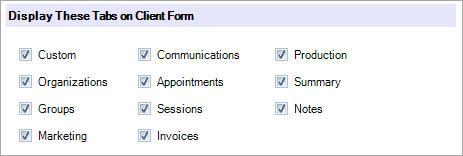
    Hiding Client Tabs in Stratus - screenshot

  3. Click OK to save your preferences.

Can't find what you need?

Email, chat, and phone support are included with every Stratus subscription. We’re here to help you build a successful business.