#
Print a list of your sessions or a set of labels for a specific date range or just include sessions in a specific promotion 
 or filter . See also: Session Promotions and Filters
-
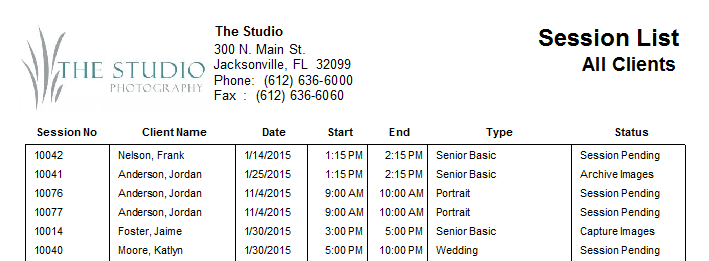
Session List – The session list includes the session number, client name, date, time, session type, and status for each session a date range, session promotion, or filter.
-
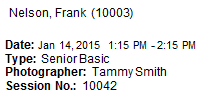
Session Labels – Session labels include the client name, client number, session date, time, type, photographer, and session number. Note: Labels are printed in a standard Avery 5160 format.
You can customize your session labels! Go to Preferences > Printing Preferences and click Custom Session Label. Use the tools on the ribbon to adjust the format and add more fields. There’s a button on the ribbon to go back to the default if you don’t like your changes. Try adding the client home phone number to the session label! See also: Printing Preferences
Printing Session Lists or Labels #
-
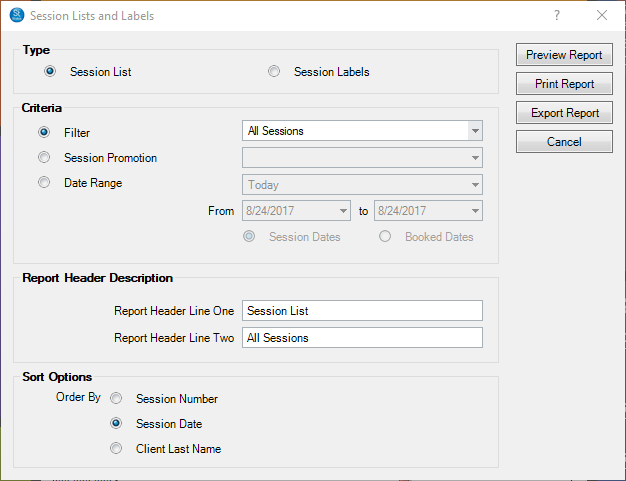
Go to Reports > Lists and Labels > Session List and Labels.
-
Select the Type, Session List or Session Labels.
-
Then select the Criteria based on a filter or a session promotion. Alternately, you can set a specific date range for the session date itself or the session booked date.
-
If you selected a session list, type or modify the Report Header Description.
-
If you selected session labels, select the label format.
-
Then click Preview Report to see a preview.
-
You can print the report or export it.