

StudioPlus Payments is Stratus’ newest payments integration, powered by Stripe. This optional add-on service connects to existing Stratus workflows while adding a more modern checkout experience and more flexible ways to collect card payments. StudioPlus Payments is currently only available in Stratus with Spectra functionality coming soon!
-
More ways to get paid: In-person reader payments, quick-send links, Buy Now, Pay Later (where available), deposits, payment plans, and InspiredByYou eCommerce.
-
A smoother checkout experience: Modern checkout with saved payment methods, tip prompts, and invoice surcharging (where permitted).
-
Better payout visibility: Payout tools to review discrepancies between Stratus and Stripe and simplify accounting exports.
#
#
All the ways to get paid #
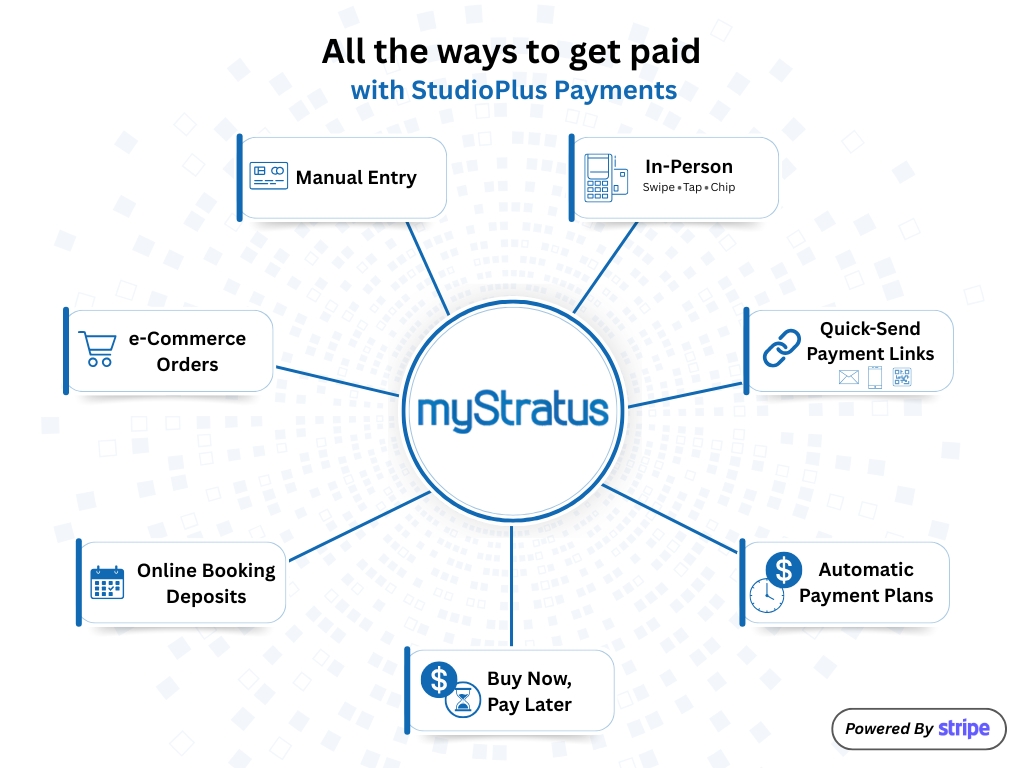
StudioPlus Payments supports the following payment workflows:
Manual Card Payments #
-
Process payments by manually entering card details directly in a PCI compliant gateway.
In-Person Payments #
-
Accept card payments using Stripe S700 series card readers.
-
Supports swipe, chip, tap, and mobile wallet payments.
Payment Links #
*Text links require SMS add-on.
Quick-send payment links
-
Generate directly from the Payment record. Instantly deliver via Email, SMS, or QR Code.
General online payment links
-
Can be emailed or texted from Client or Invoice records.
Automatic Payment Plans #
-
Use Stratus’ customizable automatic payment plan feature to collect payments over time.
-
Transition support: existing payment plans created with a legacy credit card provider can continue processing while transitioning to Stripe, helping prevent service interruptions.
Buy Now, Pay Later #
-
Offer Stripe’s Buy Now, Pay Later options where supported by Stripe (availability varies).
ACH Bank Payments #
- Let clients pay using an authorized ACH bank payment method, where available.
- ACH must first be requested in your Stripe Dashboard and then turned on in the Stratus Online admin portal (see Managing Payment Methods in Stratus Online), and the client must add and authorize the bank account through the Online Payment Portal before it can be used as a saved payment method in Stratus.
Online Booking Deposits #
-
Collect deposits through the Online Booking workflow.
InspiredByYou eCommerce Payments #
-
Accept Stripe payments through Stratus’ online eCommerce platform: InspiredByYou.
Additional Features #
StudioPlus Payments also includes:
-
Invoice surcharging to help offset processing costs (where permitted).
-
Saved client payment methods for future use (including online portals, payment records, payment plans, and more). Customers can save credit/debit cards or ACH direct payment methods.
-
Tip prompts during checkout on a terminal.
-
Payout management tool.
-
View discrepancies between Stratus and Stripe.
-
Make adjustments that help keep exports to accounting software simple.
-
Availability And Account Approval #
-
StudioPlus Payments is available wherever Stripe is available.
-
Users will have a Stripe account connected to Stratus and must still receive Stripe account approval as part of setup.
Fees #
For most card transactions processed through StudioPlus Payments, the fee has two parts, shown below. For current rates, including the lower rate for card reader transactions, see StudioPlus Payments pricing.
1) Stripe processing fees #
- Stripe sets and maintains its own processing fees and policies.
- Stripe fees can vary based on factors such as transaction type (for example, terminal transactions may incur a lower rate), card type, and Stripe’s current fee policies.
- Click here to view Stripe’s pricing.
2) StudioPlus application fee: 1.5% #
- This application fee supports the ongoing development and maintenance of the StudioPlus Payments integration and payment functionality inside Stratus.
- This fee does not apply to refunds.
Legacy Processors #
Curious about our legacy credit card processors? StudioPlus Payments is an additional payment integration option in Stratus. All existing credit card processors are not going anywhere, and their functionality will continue to stay the same! This includes Cayan (TSYS), Global Payments, and eWAY!
Ready To Get Started? #
There are three ways to start the StudioPlus Payments sign up process:
- Recommended: the Stratus Online admin portal. Go to Payments > Start Here, and Asta will walk you through enrollment. The steps are virtually the same as the ones below. New to Stratus Online? See Accessing Stratus Online.
- In Stratus Desktop, from the Home screen in the Services widget. Click “Sign Up For StudioPlus Payments” to get started.
- In Stratus Desktop, at Maintenance > Preferences > Company Preferences > Payments tab. Click the “Sign Up” button at the top.