
Do you have products you deliver electronically to your clients? Electronic delivery is now built right into Spectra and Stratus Desktop, using your online Stratus Drive storage. Just a click or two to upload the images and email your client the download link – and you’re done!
Here are just a few ways you can use this new feature:
- Deliver hi-res versions of specific ordered images to a client.
- Deliver hi-res versions of all the retouched images for a session.
- Provide your clients with a low-res version of all their sessions images, including your watermark and automatic image correction and skin smoothing applied by the Perfectly Clear plugin.
- Provide a single low-res image for a client to use on Facebook.
- Deliver a low-res, watermarked copy of a selected yearbook image for your clients to proof and approve.
Each StudioPlus product (Spectra, Stratus, and InSpiredByYou) includes an integrated Stratus Drive account with 5 GB free online storage. Your software can use this online storage to store HTML email graphics, attachments, images for electronic delivery, and more. If you need more than 5 GB, more can easily be added. For more information, look at the Stratus Drive page on our website.
Watch this video or following the instructions below to learn how to set up and use the electronic delivery features in Spectra/Stratus Desktop.
Setting up Electronic Delivery Purge Settings #
Before you start uploading images for electronic delivery, you should take a look at your purge settings in Spectra/Stratus. Your purge settings determine how long files should remain on your Stratus Drive before automatically being purged. Because storage can quickly get out of hand, these settings are important in maintaining just the files you need and not taking up storage space with those you don’t. Follow these steps to set up your purge settings for electronic delivery files:
-
In Spectra/Stratus Desktop go to Maintenance > Preferences > Company (Studio) Preferences and open the Digital tab. See also: Company (Studio) Preferences – Digital
-
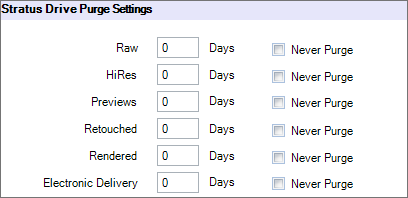
Scroll to the bottom of the Digital tab to the Stratus Drive Purge Settings section.
-
Enter the number of days electronic delivery zip files should be stored on your Stratus Drive before being purged. Note: Files will be purged automatically.
-
Click OK to save your preferences.
Delivering Electronic Files Manually #
Follow these steps to upload a zip file of images for a client to download:
-
Open a session, invoice, or production order. (Or, select a session or production order on the Workflow hub.)
-
Open the Action tab of the ribbon and click Deliver Electronically.
-
Click either the File(s) or Folder(s) option and browse to the location.
-
Choose your file(s) or folder(s) and click Open.
-
The software will create a single zip file and upload it to your Stratus Drive online storage.
-
A link to the online zip file will be created. The link will be pasted to the Status Notes of the current record (see image below), copied to your clipboard, and stored as a merge field (along with the expiration date) for the current record.

-
Paste the link from your clipboard directly into a client email or use the merge fields in a form letter or HTML email. The name of the new merge fields are “Electronic Delivery Link” and “Electronic Delivery Expiration Date.” Note: Only the most recent link will be available to be merged into a form letter or HTML email.
Automating Electronic Delivery #
-
Create items in your price list for digital delivery, such as “Digital 8X10.” Set the Vendor for these items to something like “Electronic Delivery.”
-
Create a Render Profile called “Electronic Delivery” for final ordered products. Choose the “Electronic Delivery” vendor and then be sure to check the “Upload images to Stratus Drive” check-box in the profile.
-
Create a new HTML email, stating something like “Here is the link to download the images you recently purchased. _____ This link will expire on _____.” (Inserting the appropriate electronic delivery merge fields.)
-
When a client orders digital products, these products can be easily rendered out from either the invoice or production order and be automatically zipped and uploaded. The HTML email can then be sent to the client with a link to download their images.


