
-
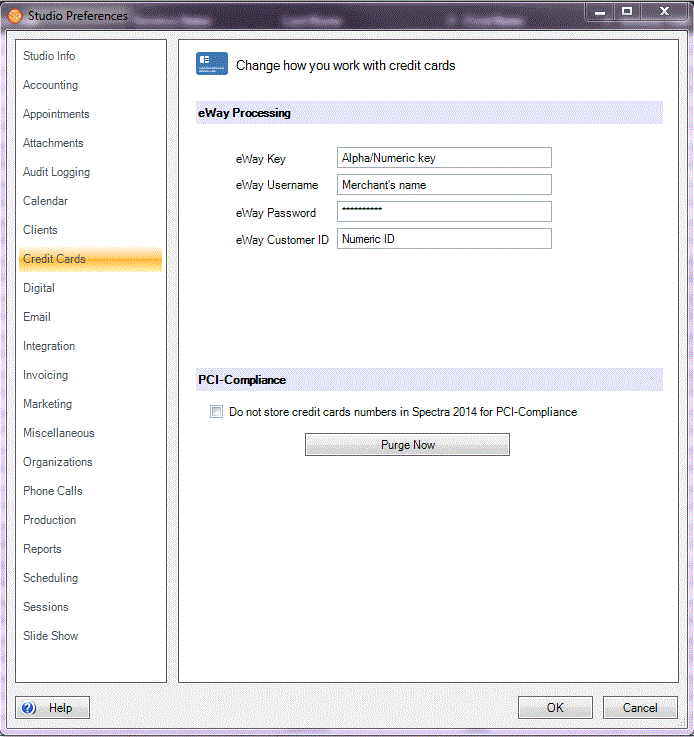
Enter the Site ID, Key, Name, User Name, and Password. This information can be found in the setup email you received from eWAY . Again, if you only received one set of credentials from eWAY , enter the same information on both tabs.
-
Enforce Address Validation – When selected, Spectra/Stratus will automatically verify that the cardholder address you entered matches the actual billing address for the cardholder. If any part of the address matches, the transaction will be allowed to go through. If none of the address matches, you will be notified with a message box asking if you wish to proceed with the transaction anyway. This optional feature provides an added level of security that you may enforce at your discretion. Note: Turning this feature on does NOT lower your rates with eWAY.
-
Enforce Security Code Validation – When selected, Spectra/Stratus will automatically check to see if the three-digit security code you entered matches the actual security code for the cardholder. If the code matches, the transaction will be allowed to go through. If the code does not match, you will be notified with a message box, asking if you wish to proceed with the transaction anyway. This optional feature is an added level of security that you may enforce at your discretion. Note: Turning this feature on does NOT lower your rates with eWAY .
-
Do not store credit card numbers for PCI compliance – When you select this option, the credit card text boxes will be locked. The merchant will NOT be allowed to enter information into these fields. To process a credit card, Spectra/Stratus will open a special window provided by eWAY. The merchant can then key information into this window. eWAY will encrypt and transmit the information to themselves for processing. The authorization or decline code will then be passed back to Spectra/Stratus, along with a unique token that can be used for future transactions using this credit card information. Because Spectra/Stratus never touches the credit card details and never stores the credit card information in its database, Spectra/Stratus is removed from PCI compliance scope. As a result, the process for your business to become PCI compliant is much simpler. It is highly recommended you select this option.
-
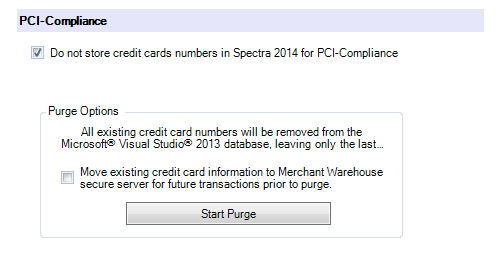
Move existing credit card information to eWAY secure server for future transactions prior to purge – This option will send necessary credit card numbers to the eWAY secure server prior to deleting them. eWAY will then provide Spectra with a unique token that can be used down the road to process a pending payment, a payment plan, or any other payment you wish using this credit card. It is recommended that you check this box.
-
Pending Payments – The database will be scanned for existing payment records that are still pending. For each pending payment, the card number will be removed from the pending payment record, leaving only the last four digits of the card number. If the check box for moving the information to eWAY is checked, the credit card details will be sent to the eWAY secure server and Spectra will receive a unique token back. The token is stored with this pending payment record to be used later, when the payment is actually due.
-
Client Payment Methods – The database will be scanned for all credit card numbers stored as a client payment method. For each credit card payment method found on a client record, the card number will be removed from the payment method, leaving only the last four digits of the card number. If the checkbox for moving the information to eWAY is checked, the credit card details will be sent to the eWAY secure server and Spectra will receive a unique token back. The token is stored with this client payment method to be used later. Note: If the credit card is marked as inactive or if the card has expired, the credit card payment method will be deleted.
-
Previous Payments – The database will be scanned for all credit card payments that have already been recorded. For each payment, the card number will be removed from the payment, leaving only the last four digits of the card number.
#
#
#
eWAY is a credit card processing company that integrates directly with Spectra, Stratus, and InSpiredByYou. In addition to making credit card processing extremely easy, StudioPlus and eWAY take much of the hassle out of fulfilling the requirements for your business to become PCI compliant. Click here to learn more about PCI compliance and how it affects you.
Use the Credit Cards page of Studio Preferences to set up the eWAY integration. See also: Credit Card Processing
eWAY Account #
You must have an account established with eWAY. If you don’t have an account set up yet, click here for more information and to receive a no-obligation rate quote from eWAY which is the first step to establishing your account.
eWAY Integration #
Once you have your account established, eWAY will email you several key pieces of information, called your account credentials.
It is highly recommended you select the option to “Not store credit card numbers for PCI compliance.” Doing so will safeguard your client’s sensitive credit card details, and will make the process for your business to become PCI compliant much simpler.
#
Purge Existing Credit Card Information #
If you have been storing credit card information inside Spectra prior to selecting the “Do not store credit card numbers for PCI compliance” option, you must run a purge routine to remove those existing credit cards from the database. To do this, click Purge Now. You will then see the following:
ATTENTION!
It is recommended you back up your StudioPlus Spectra database prior to running a purge routine.
The purge routine can take some time to run, depending on how long you have been using StudioPlus Spectra and how many card numbers are present. For large databases, we recommend allowing at least two hours for the routine to run.
Click Start Purge to begin the purge routine. The following items will be scanned and purged:
See also: Credit Card Processing


