
#
   |
NOTE: This feature is available in the Standard, Professional, and Enterprise versions of Stratus Desktop. |
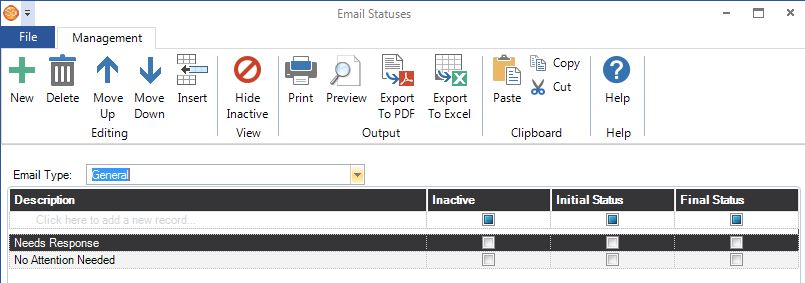
Email Statuses are used to track the current status of each of your email messages. To create your email statuses, go to Maintenance > Communication > Email Statuses. If you track multiple email types, you can create a unique set of statuses for each type. Use the tools on the ribbon to add or delete a status, rearrange the order of the statuses, and print or export the email statuses list.
-
Email Type – Select the type of email message the statuses will be related to. Set up message types in Maintenance > Communication > Email Types.
-
Description – Enter the name of the step you are creating.
-
Inactive – Mark a status as “inactive” if you no longer use it, but have used it in the past.
-
Initial Status – Select the status that should be the default initial status of an email when it is created.
-
Final Status – Select the status that will indicate the email’s final stage.